

THE THREADKORE PLATFORM

Built for your business today.
Ready for what comes next.

ThreadKore connects accounting, construction, sales, and customer experience on one platform. Choose the tools your business needs today. Expand as your needs grow, with Orbit bringing intelligence to your connected information.

Explore the four business pillars

Finance & Accounting

Know the numbers. Protect the margin.

Connect commitments and actual costs to the financial story.

Operations & Construction

Plan the work. Deliver the home.

Keep the home, the scope, and the people doing the work together.

ThreadKoreOne operating system.One System of Record.Orbit · Intelligence across it all

Sales & Marketing

Create demand. Close homes.

Carry relationships and buyer decisions into the work your team delivers.

Customer Experience

Guide the buyer. Build confidence.

Keep the buyer’s decisions and the home’s history in context.

Each tool has one primary home. Connections show how it supports the other teams using the same record.

Looking ahead? Explore Coming Soon or Future Roadmap.

Follow a selection, invoice, margin review, or sales lead

This could be your everyday

One moment.
A more connected day.

Pick a moment. Follow what happens next.
See how the work connects.

ONE HOME. ONE CONNECTED RECORD.

The buyer changes their mind.

One choice. Four teams. Keep the whole story.

A kitchen upgrade touches more than a design sheet. Follow the decision into purchasing, cost, and the financial conversation.

LOT 42

DecisionCommitmentContext

Illustrative workflow and sample data. This is a guided story, not a live product screen.

Explore theHOMESapp ↗

Every step adds context.
Orbit brings intelligence to the connected record.

See real intelligence in action ↗
Make the conversation yoursChoose your business and role
Your business · Select all that apply
Your role · Select all that apply
Plan my walkthrough →
See the handoffs from a home’s setup to financial reporting

Follow one home

Different responsibilities.
One continuous thread.

A connected workflow overview. Each team contributes context that makes the next step more useful.

  1. 01

    Start with the place

    MyPM ↗

    Community, lot, address, and unit record

    What carries forward

    The home gives every team a common reference.

  2. 02

    Define the home

    theHOMESapp ↗

    Plan, design decisions, retail pricing, and signatures

    What carries forward

    The decisions provide context for estimating and purchasing.

  3. 03

    Commit to the work

    Purchasing & PO workflows ↗

    Takeoffs, budgets, POs, variants, and back charges

    What carries forward

    The commitment gives vendor coordination and invoice review a reference.

  4. 04

    Coordinate the participants

    JobCloser ↗

    Builder, trade, and vendor relationships

    What carries forward

    The businesses doing the work stay connected to the builder relationship.

  5. 05

    Review the invoice

    AP Launch ↗

    Invoice, vendor, unit, and purchasing context

    What carries forward

    The review connects the transaction with the financial workflow.

  6. 06

    Understand the financial result

    BuildingBlocks ↗

    Budgets, commitments, actual costs, and reporting

    What carries forward

    Orbit can bring intelligence to the connected operating and financial record.

Orbit across the record

The more context stays connected,
the more useful the conversation becomes.

ThreadKore records the work. Orbit analyzes the connected record to help teams investigate changes and compare business information. Orbie supports the people using it.

See real intelligence in action →

Native accounting. Connected operations.

The financial story starts
before the invoice.

  1. Operational decisionA selection, takeoff, or change defines the work.
  2. Purchase commitmentThe PO connects scope, vendor, quantity, and price.
  3. Actual costApproved invoices posted to the ledger record actual costs. Payment is a separate step.
  4. Financial reportingBuildingBlocks brings job costs and the ledger into view.
BuildingBlocks™ · Native accounting inside ThreadKore

Finance and operations can follow the same home from the original budget through commitments and actual costs.

See the accounting foundation

BUILD YOUR THREADKORE

Start with what you need.
Build from there.

Choose your priorities and the tools you want to explore. We’ll tailor a demonstration to your business and show how ThreadKore can support your next stage.

Review my demo plan 0
Four Kores. One connected business.

Choose your priorities to focus the catalog. Orbit brings intelligence across all four.

Available capabilities

Available Today

Start with the workflows your team can use today.

Operations & Construction

Scheduling & constructionMyPMProduct · Available todayGive every home a shared starting point.

Operations & Construction

MyPM

Available today

Give every home a shared starting point.

What it does

Organize communities, lots, addresses, and unit records. Keep development milestones and construction context with the home so teams can find the same starting point.

Who uses it

Operations leaders, project managers, and construction teams

Capabilities to explore

Subdivision and lot organization

Organize the community and lots that provide the starting point for each unit.

Unit addresses, plans, and reference information

Create a common home record with the location and reference details the team uses.

Development and construction milestones

Keep milestones and dates in the context of the community and home.

Project documents and coordination

Bring project documents and communication into the conversation around the work.

Land, lots & communities

Start with a record that belongs to the home.

Organize subdivisions, lots, addresses, phases, and development dates. Bring the lot into a building unit with the context your team needs.

  • Subdivision and lot organization
  • Unit setup and reference information
  • Development and vertical milestones
Construction & field coordination

Keep the field and the office on the same job.

Connect schedules, project communication, documents, and changes to the work being built. Give the team a shared place to find the details.

  • Scheduling and field coordination
  • Project documents and communication
  • Changes tied to the job
  • Vendor and trade collaboration

Follow the work

  1. Establish the home

    Create the unit with its lot, address, and reference information.

  2. Keep the context

    Bring milestones and project details into the construction conversation.

  3. Carry it forward

    Give selections, purchasing, and finance a common home record.

Explore experience

Sales & Marketing

Options, pricing & contractstheHOMESappProduct · Available todayKeep the buyer’s promise connected to the build.

Sales & Marketing

theHOMESapp

Available today

Keep the buyer’s promise connected to the build.

What it does

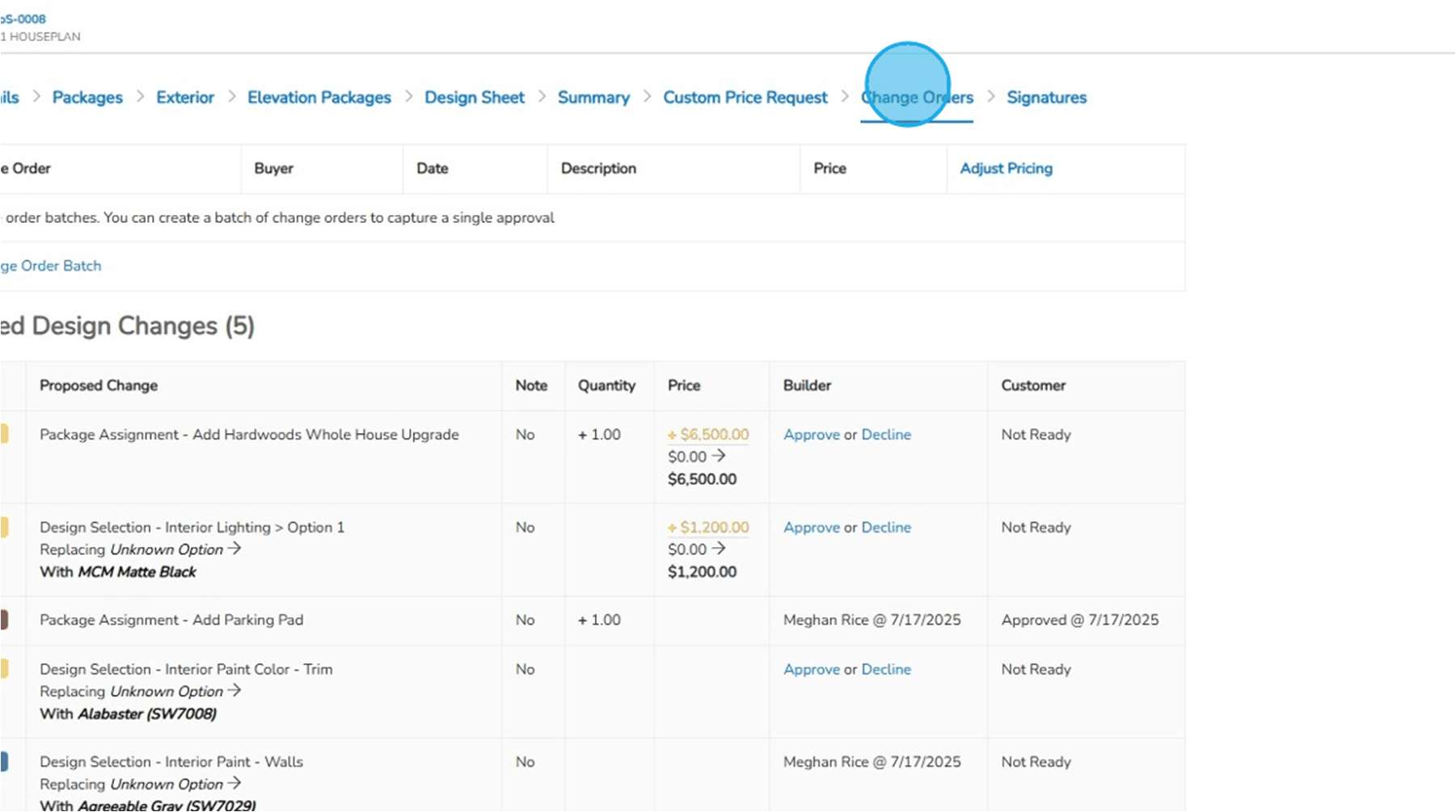
Bring Guided Start, plans, design sheets, retail pricing, and signatures together. Document selection changes so the team can follow what was decided and approved.

Who uses it

Sales, design, estimating, and construction teams

Capabilities to explore

Guided Start, plans, and packages

Organize the home’s plan and package choices before committing the work.

Design sheets and retail price history

Keep design categories and choices with their retail pricing and price history.

Finalized selections and proposed design changes

Finalize decisions and use the proposed-change process for subsequent changes.

Change-order batches and contract signatures

Group proposed changes and capture approval/signature records around the home.

Plans, pricing & selections

Make the promise clear before the work begins.

Use Guided Start, plan selection, design sheets, and retail pricing to organize what the buyer is choosing and what your team is preparing to build.

  • Plan and package selection
  • Design categories and groups
  • Retail pricing and price history
  • Contract document signature batches

Follow the work

  1. Define the promise

    Organize the plan, design choices, and retail pricing.

  2. Document the change

    After finalization, review proposed design changes and approval batches.

  3. Prepare the next team

    Use the recorded decisions as context for purchasing and construction.

Explore experience

Operations & Construction

Purchasing & estimatingPurchasing & PO workflowsCapability group · Available todayKnow the scope before you commit.

Operations & Construction

Purchasing & PO workflows

Available today

Know the scope before you commit.

What it does

Import unit takeoffs, compare budgets, and issue purchase orders with job and vendor context. Document exceptions through variant purchase orders, approval levels, reasons, and back charges.

Who uses it

Estimators, purchasing teams, and construction managers

Capabilities to explore

Takeoff imports and budget updates

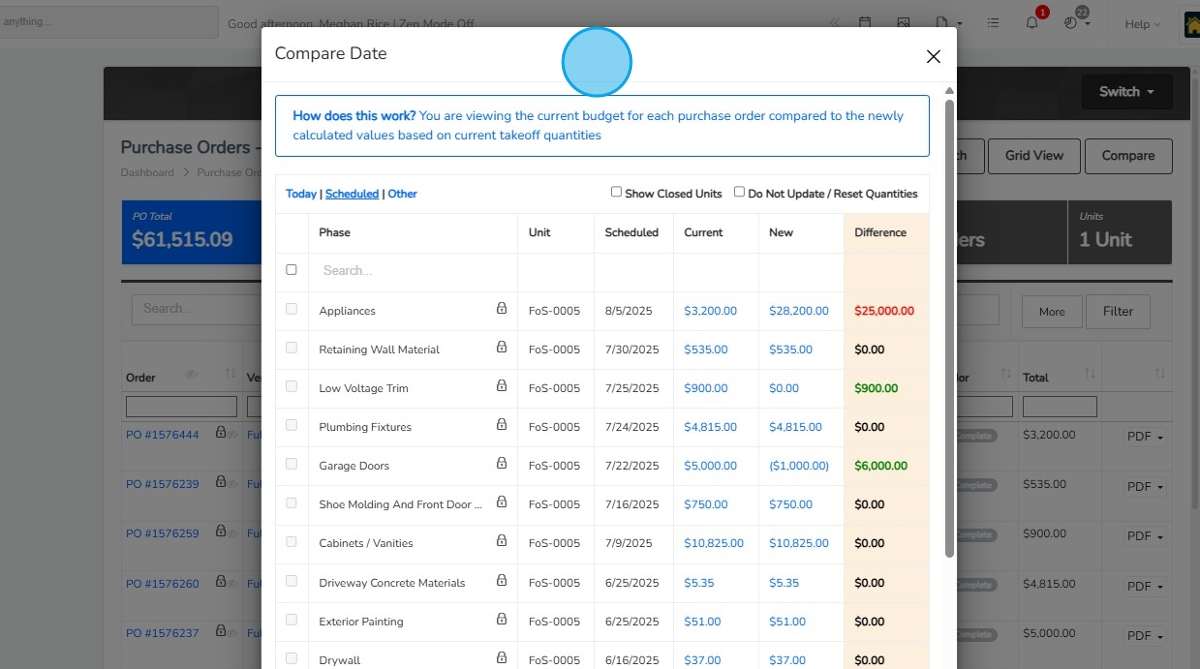
Import unit takeoffs and compare current quantities and pricing with the budget before updating it.

PO quantities, prices, vendors, and unit context

Record the vendor, home, scope, quantity, and price on the purchase order.

Budget comparison and linked invoices

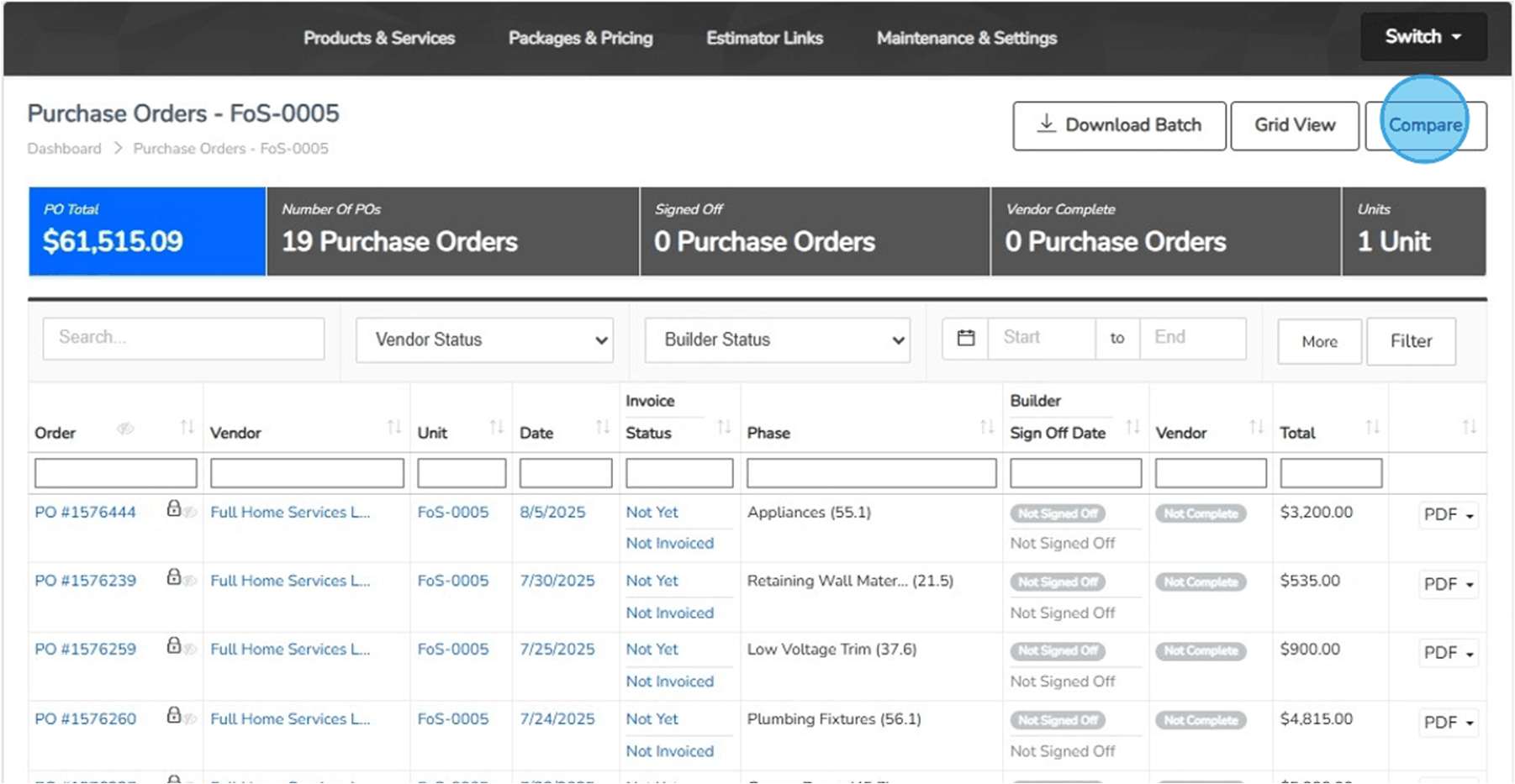
Compare PO budgets and open associated invoices from the purchasing record.

VPO reasons, approval levels, and back charges

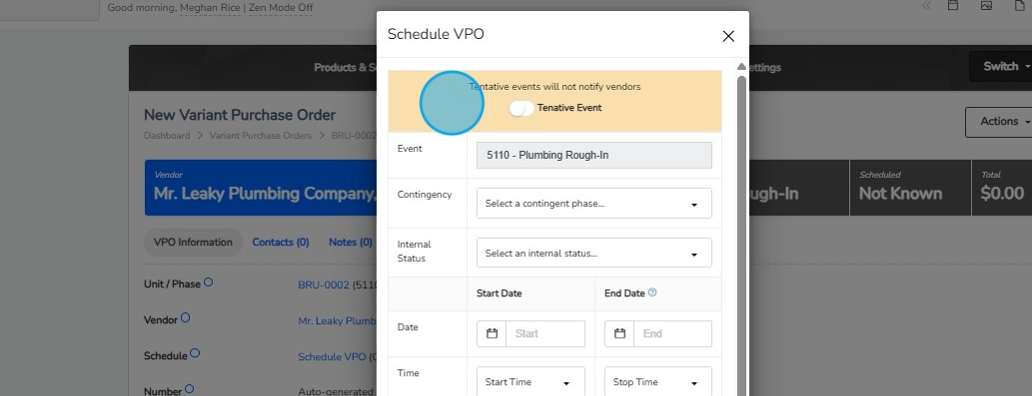
Document the reason for an exception and retain its approval and back-charge context.

Estimating & purchasing

Connect what you plan to what you commit.

Import unit takeoffs, adjust quantities and product details, and compare the takeoff with the budget. Issue purchase orders with the scope and project details vendors need.

  • Unit takeoff import and budget updates
  • Purchase orders by unit or across jobs
  • Budget comparison
  • Variant purchase orders and back charges

Follow the work

  1. Set the expectation

    Bring takeoff quantities and pricing into the budget review.

  2. Record the commitment

    Issue a PO for the vendor, unit, scope, and price.

  3. Explain the exception

    Use VPO reasons, configured approvals, and back charges to preserve the change history.

Explore experience

Finance & Accounting

Job cost & accountingBuildingBlocksProduct · Available todayPut the financial story beside the work.

Finance & Accounting

BuildingBlocks

Available today

Put the financial story beside the work.

What it does

Review budgets, commitments, invoices, posted accounting entries, and payments in the context of each home. Projected home margin includes the costs to build, hold, and sell. Anticipate cash needs and expected funding using connected construction and financial information.

Who uses it

CFOs, accounting teams, and business leaders

Capabilities to explore

Job budgets and actual costs

Review the expected cost alongside the transactions and commitments behind the job.

Accounts payable and receivable

Keep payables and receivables in the wider accounting context of the business.

Financial statements and reporting

Bring the native accounting record into financial reporting and the leadership conversation.

Transaction detail connected to the job

Return to the home and underlying transaction when a financial result needs explanation.

BuildingBlocks accounting

Native accounting inside the Business Operating System.

BuildingBlocks brings native accounting, job costs, commitments, and financial reporting into the same platform as the operation. Follow the dollars alongside the work.

  • Job budgets and actual costs
  • Accounts payable and receivable
  • Financial statements and reporting
  • Transaction detail connected to the job

Follow the work

  1. Start with the job

    Review its budget and committed work.

  2. Follow the actuals

    Bring payables, receivables, and transaction detail into the financial record.

  3. Investigate the result

    Give finance and operations the context for their next job-cost review.

Explore experience

Finance & Accounting

Invoices & accounts payableAP LaunchProduct · Available todayGive the invoice a clear path to the ledger.

Finance & Accounting

AP Launch

Available today

Give the invoice a clear path to the ledger.

What it does

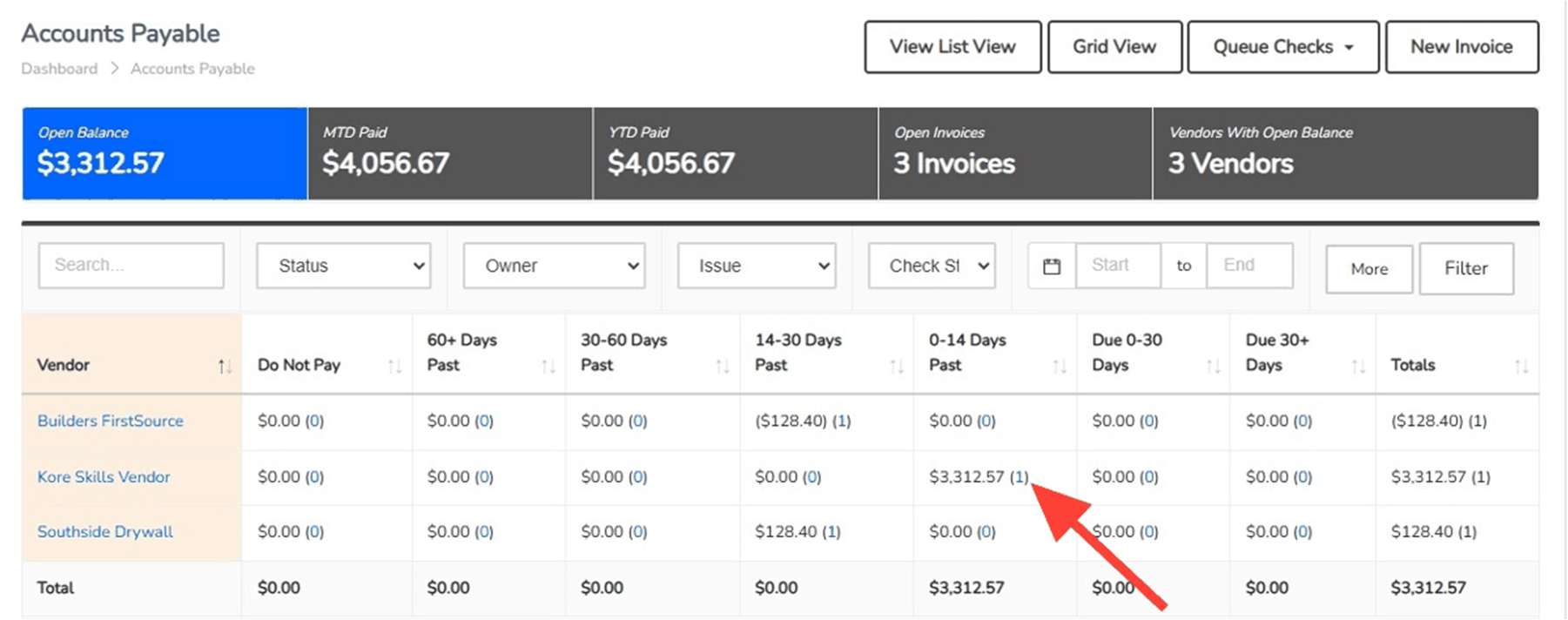
Manage the billing inbox, invoice attachments, allocations, and approvals with the vendor and job in view. Follow the purchasing context through review and posting.

Who uses it

Accounts payable, accounting, and purchasing teams

Capabilities to explore

Billing inbox and queued invoices

Bring incoming documents into the invoice review process through the billing inbox and queue.

Attachments and split-screen invoice review

Review invoice information alongside its supporting attachment.

Unit, subdivision, and account allocation

Allocate the invoice to the unit, subdivision, or account that gives the cost its context.

Approvals, do-not-pay status, and ledger posting

Assign approvers, retain invoices for review when needed, and post the invoice to the ledger.

AP & transaction workflows

Give every invoice a place in the process.

AP Launch supports the accounts payable workflow. Bring incoming invoices into a review process alongside the vendor, job, and purchasing information your team uses.

  • Invoice intake and review
  • Vendor and unit context
  • Purchasing and budget visibility
  • Connected accounting workflow

Follow the work

  1. Receive and allocate

    Review the incoming document and assign its vendor, unit, subdivision, or account.

  2. Review and approve

    Use the attachments and purchasing context; route approvals and hold invoices when needed.

  3. Post and follow

    Post the invoice to the ledger and retain the record behind the cost.

Explore experience

Finance & Accounting

Billing & receivablesARLaunchProduct · Available todayKeep the receivable connected to the relationship.

Finance & Accounting

ARLaunch

Available today

Keep the receivable connected to the relationship.

What it does

Bring billing and accounts receivable into the conversation around the customer, the job, and the financial record.

Who uses it

Receivables and accounting teams

Capabilities to explore

Billing and receivables workflows

Bring billing and accounts receivable into the conversation around the customer, the job, and the financial record.

Customer and job context

Bring billing and accounts receivable into the conversation around the customer, the job, and the financial record.

Connection to the accounting record

Bring billing and accounts receivable into the conversation around the customer, the job, and the financial record.

Follow the work

  1. Start with the relationship

    Identify the customer and the job behind the billing.

  2. Follow the receivable

    Keep the receivables workflow in its accounting context.

  3. Review the picture

    Bring billing questions to the broader financial conversation.

Explore experience

Operations & Construction

Trades & vendor coordinationJobCloserProduct · Available todayGive both sides a clearer view of the work.

Operations & Construction

JobCloser

Available today

Give both sides a clearer view of the work.

What it does

Bring trades and vendors into their builder relationships. Connect vendor-visible purchase orders, invoice submissions, and compliance documents with the builder’s operating record.

Who uses it

Builders, trades, and vendors

Capabilities to explore

Builder invitations and vendor access

The builder invites trades or vendors to join the working relationship in JobCloser.

Vendor-visible purchase orders

Vendors can review purchase orders made visible by the builder.

PO and VPO invoice submissions

Bring vendor invoice submissions back into the builder’s review process.

Compliance document submissions and review

Vendors submit compliance documents for builder review; Vendor Management retains request history.

Vendors & JobCloser

Bring the businesses doing the work into the thread.

Manage vendor contacts, assignments, pricing, and compliance documents. Invite trades and vendors into JobCloser to collaborate with their builder relationships.

  • Vendor records and pricing
  • Compliance document management
  • JobCloser invitations
  • Trade and vendor participation today

Follow the work

  1. Join the relationship

    The builder invites the vendor into JobCloser.

  2. Find the work

    Review the purchase orders made visible by the builder.

  3. Carry the record back

    Submit PO or VPO invoices and compliance documents for the builder’s review.

Explore experience

Across all Four Kores

Business questions & analysisOrbit & OrbieProduct · Available todayUnderstand the business behind the numbers.

ACROSS ALL FOUR PILLARS

Orbit & Orbie

Available today

Understand the business behind the numbers.

What it does

ThreadKore is the system of record. Orbit analyzes connected operational and financial information to help teams investigate changes and compare records. Orbie supports clients along the way.

Who uses it

Leaders and teams investigating operational and financial questions

Capabilities to explore

Operational and financial context

ThreadKore is the system of record. Orbit analyzes connected operational and financial information to help teams investigate changes and compare records. Orbie supports clients along the way.

Connected business analysis

ThreadKore is the system of record. Orbit analyzes connected operational and financial information to help teams investigate changes and compare records. Orbie supports clients along the way.

Orbie client support

ThreadKore is the system of record. Orbit analyzes connected operational and financial information to help teams investigate changes and compare records. Orbie supports clients along the way.

A growing intelligence layer

ThreadKore is the system of record. Orbit analyzes connected operational and financial information to help teams investigate changes and compare records. Orbie supports clients along the way.

Follow the work

  1. Ask a business question

    Start with a home, a transaction, or a result you want to understand.

  2. Explore the context

    Use the connected operational and financial history in the analysis.

  3. Decide the next step

    Review the supporting information with the team and follow the question into action.

Explore experience

Customer Experience

Closing & customer careClosing & customer careCapability group · Available todayHand over the keys. Keep the history.

Customer Experience

Closing & customer care

Available today

Hand over the keys. Keep the history.

What it does

Connect closing coordination and ongoing customer care to the home’s operating record, so your team can return to the details behind the finished home.

Who uses it

Customer-care teams, closing coordinators, and construction teams

Capabilities to explore

Closing coordination

Keep closing information in the context of the home and buyer.

Home and buyer context

Return to the record of the home and its buyer decisions.

Customer care and warranty workflows

Connect ongoing customer care to the details behind the finished home.

Closing & customer care

Hand over the keys. Keep the history.

Connect the closing process and ongoing customer care to the home’s operating record, so your team can return to the details behind the finished home.

  • Closing coordination
  • Home and buyer context
  • Customer care and warranty workflows
Explore experience

Customer Experience

Options & design selectionsDesign CenterCapability within theHOMESapp · Available todayMake every choice clear. Keep the build in step.

Customer Experience

Design Center

Available today

Make every choice clear. Keep the build in step.

What it does

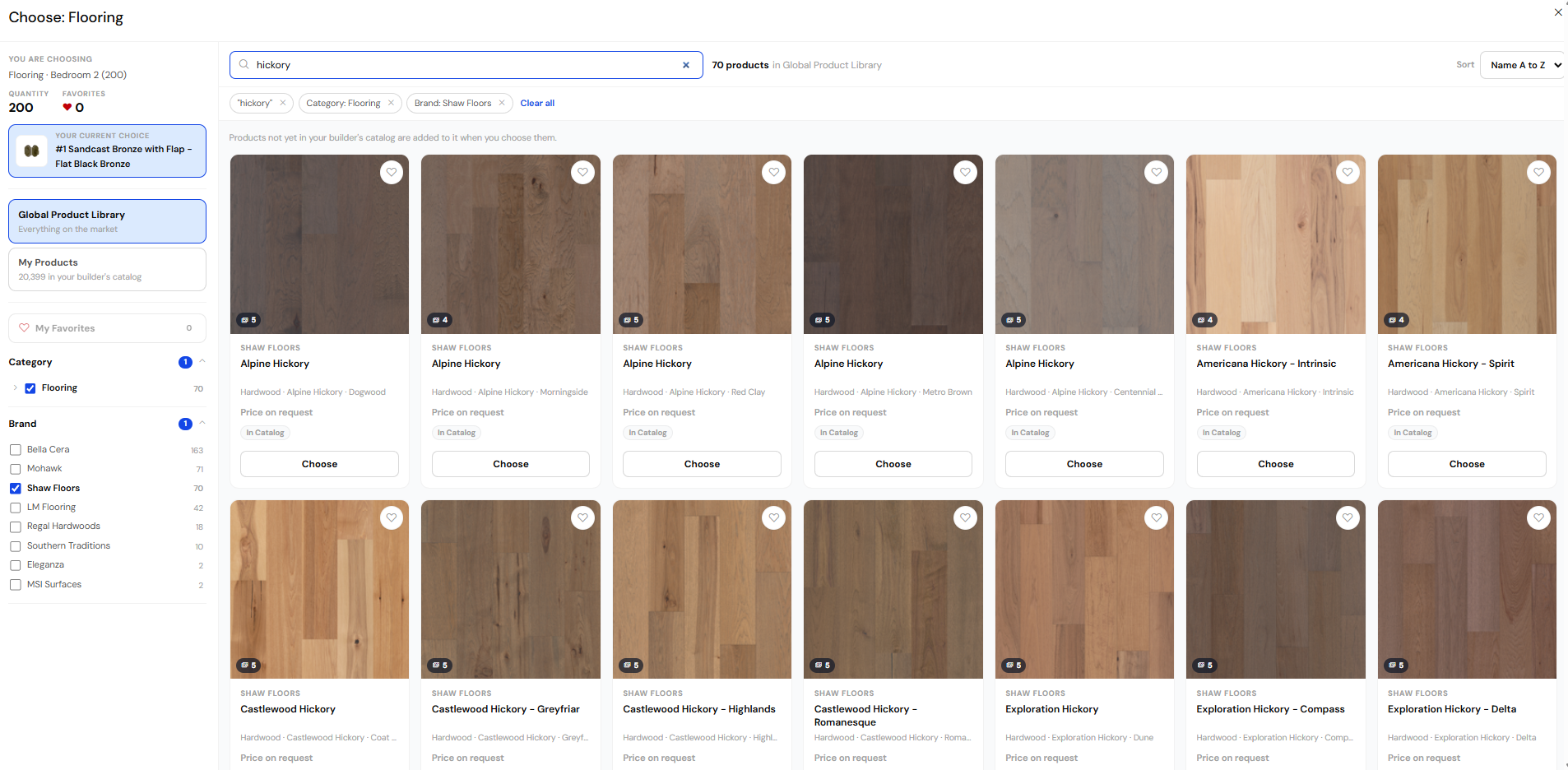
Guide buyers through the finishes, options, and packages that make a home their own. Within theHOMESapp, your team can organize design selections, show available option images, review retail pricing, and document approved decisions. Keep those choices with the home so purchasing and construction can work from the agreed scope.

Who uses it

Design consultants, sales teams, and the purchasing and construction teams carrying out buyer decisions

Capabilities to explore

Organized selections and packages

Group selections into design categories and configure which choices appear for the home and its selected packages.

Option images and vendor context

Use supplied product images to make choices easier to understand. Design options are configured with the assigned vendor’s information.

Retail pricing alongside the choice

Review the retail pricing for selections and packages, keeping the buyer’s price distinct from vendor cost.

Documented decisions and approvals

Finalize the design sheet with the approver’s name and capture additional signatures where needed. Subsequent changes follow the proposed-change and approval process.

Changes carried into the build

Review selection changes in change-order batches. Approval and finalization are separate steps; finalization updates budget and list-price details so the next team can review the agreed change.

Follow the work

  1. Guide the choices

    Review the home’s design sheet, options, packages, and pricing with the buyer.

  2. Record the agreement

    Finalize decisions and route later changes through the approval process.

  3. Prepare the handoff

    Give purchasing and construction the selection and change context behind the work.

Explore experience

Planned & coming soon

Coming Soon

Explore the next experiences. Existing planned dates are targets, not commitments.

Customer Experience

Buyer & homeowner portalMyKotiva WebsiteProduct · Coming Q4 2026A connected home experience, beyond the keys.

Customer Experience

MyKotiva Website

Coming Q4 2026

A connected home experience, beyond the keys.

What it does

MyKotiva is the homebuyer and homeowner website coming Q4 2026, designed to carry the story of the home through the life of ownership.

Who uses it

Homebuyers, homeowners, and builder customer teams

Planned capabilities

Planned buyer selections experience

MyKotiva is the homebuyer and homeowner website coming Q4 2026, designed to carry the story of the home through the life of ownership.

Walkthrough and home information

MyKotiva is the homebuyer and homeowner website coming Q4 2026, designed to carry the story of the home through the life of ownership.

A continuing ownership record

MyKotiva is the homebuyer and homeowner website coming Q4 2026, designed to carry the story of the home through the life of ownership.

Explore experience

Sales & Marketing

Sales leads & follow-upCadence2CloseProduct · Planned · November 2026Connect the next conversation to the relationship.

Sales & Marketing

Cadence2Close

Planned · November 2026

Connect the next conversation to the relationship.

What it does

An expanded CRM experience connecting pipeline, relationships, and follow-up. Planned for November 2026.

Who uses it

Sales and marketing teams and their leaders

Planned capabilities

Pipeline and relationship context

An expanded CRM experience connecting pipeline, relationships, and follow-up. Planned for November 2026.

Follow-up workflows

An expanded CRM experience connecting pipeline, relationships, and follow-up. Planned for November 2026.

Expanded CRM experience

An expanded CRM experience connecting pipeline, relationships, and follow-up. Planned for November 2026.

Explore experience

Operations & Construction

Capture the buildKoreCaptureProduct · Planned · Q4 2026Preserve more of the story of the build.

Operations & Construction

KoreCapture

Planned · Q4 2026

Preserve more of the story of the build.

What it does

A planned experience for capturing the story of the home as it comes together.

Who uses it

Construction and project teams

Planned capabilities

Home and build context

A planned experience for capturing the story of the home as it comes together.

Planned capture experience

A planned experience for capturing the story of the home as it comes together.

Explore experience

Sales & Marketing

Explore the home visuallyKoreToursProduct · Planned · Q4 2026Explore the story of the home.

Sales & Marketing

KoreTours

Planned · Q4 2026

Explore the story of the home.

What it does

A planned experience for exploring the home as it comes together.

Who uses it

Sales and construction teams

Planned capabilities

Home exploration

A planned experience for exploring the home as it comes together.

Connected home context

A planned experience for exploring the home as it comes together.

Explore experience

Operations & Construction

Design & renderingOrbit StudioProduct · Coming soonBring design into the bigger picture.

Operations & Construction

Orbit Studio

Coming soon

Bring design into the bigger picture.

What it does

Orbit Studio brings BIM, design, build, and rendering into the ThreadKore vision.

Who uses it

Design, sales, and construction teams

Planned capabilities

BIM and design direction

Orbit Studio brings BIM, design, build, and rendering into the ThreadKore vision.

Build and rendering vision

Orbit Studio brings BIM, design, build, and rendering into the ThreadKore vision.

Explore experience

Direction & prototypes

Future Roadmap

Discuss upcoming priorities and prototypes. Production scope and timing are not confirmed.

Finance & Accounting

Invoice automationAPLaunch.AIProduct direction · Upcoming focusLess time preparing an invoice for review. More attention on the cost, context, and approval behind it.

Finance & Accounting

APLaunch.AI

Upcoming focus

Less time preparing an invoice for review. More attention on the cost, context, and approval behind it.

What it does

The next step for accounts payable: use AI to help prepare invoice information, connect it to the work, and bring the items needing attention to your team. AP Launch is available today. APLaunch.AI is the upcoming automation direction; release timing has not been announced.

Who uses it

AP, finance, and purchasing teams

Planned capabilities

Read the invoice

Help extract invoice information from incoming documents and attachments.

Bring the context

Connect the vendor, home, cost code, and purchasing information needed for review.

Review what needs attention

Surface questions and exceptions, with your team responsible for approvals.

Explore experience

Sales & Marketing

Builder websitesWebLaunchAIProduct direction · Upcoming focusA clearer path from business information to the customer-facing website, with less disconnected content management.

Sales & Marketing

WebLaunchAI

Upcoming focus

A clearer path from business information to the customer-facing website, with less disconnected content management.

What it does

Website management connected to ThreadKore. The direction is to bring the information you maintain for your business closer to the content buyers see online. Website management is an upcoming focus. Specific publishing capabilities, integrations, and release timing have not been announced.

Who uses it

Marketing and website teams

Planned capabilities

Start with the business

Use the connected record as the foundation for website information.

Manage the experience

Bring website content and updates into the marketing team’s workflow.

Connect the journey

Help the website reflect the business behind the homes and customer relationships.

Explore experience

Finance & Accounting

Financial planningPro forma modelingCapability group · Enhancements in prototypeSee the assumptions behind the forecast and the decisions behind the result, from one community to the whole company.

Finance & Accounting

Pro forma modeling

Enhancements in prototype

See the assumptions behind the forecast and the decisions behind the result, from one community to the whole company.

What it does

Build from Community Plans, connect the results to accounts, and roll up a company view. Explore how sales pace, selling prices, and construction costs change the plan. These enhancements build on existing pro forma functionality. Scenario controls, calculation inspection, and expanded consolidation are demonstrated in a prototype; production scope and release timing remain to be confirmed.

Who uses it

CFOs, business leaders, and planning teams

Planned capabilities

Build the plan

Select Community Plans and connect their contributions to financial accounts.

Test the decision

Explore changes in sales velocity, home prices, and direct costs. Compare revisions and operating breakeven.

Follow the numbers

Roll up subdivisions, areas, and markets. Inspect monthly calculations and the sources behind totals.

Explore experience
Explore ThreadKore

YOUR BUSINESS. YOUR NEXT STAGE.

See ThreadKore at work for you.

Bring your priorities and questions. We’ll tailor the demonstration around your business.

Book a tailored demo

Your privacy choices

May we measure visits, estimate your country, state/region and city, and use advertising cookies? Accept enables optional tracking and Google, Meta, and LinkedIn tags. Decline keeps it off.

What we collect

With your permission, we save page views, navigation and button clicks, scroll depth, successful request counts, and page-load and responsiveness measurements for future reports. These activity records never include form contents, names, email addresses, or raw IP addresses.

We also save a network-based country, state/region and city estimate provided by our hosting service. We never request GPS access or store coordinates, street addresses, or postal codes. Estimates may be inaccurate, especially with a VPN, and unavailable locations stay unknown.

New location records expire after 720 days and are excluded from current reports then. Records collected under an earlier 90-day choice keep that shorter expiration. Expired records are cleared as the site receives requests; no location history is backfilled from visits before this consent.

We also keep anonymous, grouped operational counts of request errors, missing pages, form failures, and rate limits to maintain the site. These are separate from optional visitor analytics and contain no visitor identifiers or submitted details.

Google, Meta, and LinkedIn may use cookies to measure visits and personalize advertising. Your choice is remembered for six months; you can change it here at any time. Contact forms work either way.