
FOR FINANCE & ACCOUNTING
Know what each home should earn. Understand where the money stands.
Review expected margin, anticipate cash needs, and trace a balance back to the home and transaction behind it. ThreadKore brings native BuildingBlocks accounting together with the work of purchasing, construction, and sales.
You are accountable for the answer. The causes span the business.
What should this home earn?
A sale price is clear. The full cost to build, hold, and sell the home takes more investigation.
Review the home’s budget, commitments, invoices, and projection together. Follow a cost change into the purchasing record before explaining its effect on expected margin.
When will we need cash?
Profit on paper does not tell you when the business will need cash.
Anticipate cash needs and expected funding using connected construction and financial information. Bring the operating context into the funding conversation.
What makes up this balance?
A WIP total is hard to act on until you can see the homes and entries that make it up.
Start with the balance, identify the home, and review the supporting entries. Keep commitments, invoices, posted accounting entries, and payments distinct.
FOLLOW THE BALANCE
From a number to the work behind it.
Start with WIP. Choose a community, home, and cost, then open the transaction behind the balance.
- The problem
A work-in-process balance is a starting point. You need to understand the homes and recorded transactions behind it.
- What you do in TK
Review the job and transaction detail in BuildingBlocks. Compare posted entries with the related purchasing and invoice records.
- What you see
Separate committed work, received invoices, posted accounting entries, and payments. Submitting an invoice does not mean it has been paid.
- The decision it supports
Investigate an unexpected balance, resolve coding or supporting-document questions, and determine any correction with accounting. WIP cleanup means understanding and resolving balances; it does not automatically release cash.
ALDER & STONE BUILDERS
Inside the balance sheet.
Illustrative demonstration · September 30, 2026 · USD. All names, amounts, and documents are fictional. This is not a production ThreadKore screen or a forecast.
Assets
- Operating cash
- $1,278,100.00
- Buyer deposit cash
- $85,000.00
- Receivables
- $15,000.00
- Prepaid insurance
- $12,000.00
- Work in process →
- $2,006,000.00
- Land development
- $620,000.00
- Lot inventory
- $1,200,000.00
- Equipment & vehicles
- $180,000.00
- Accumulated depreciation
- ($27,000.00)
- Total assets
- $5,369,100.00
Liabilities
- Trade accounts payable
- $263,100.00
- Buyer deposits
- $85,000.00
- Accrued expenses
- $22,000.00
- Construction loans
- $1,422,000.00
- Land & development loan
- $1,000,000.00
- Equipment loan
- $120,000.00
- Total liabilities
- $2,912,100.00
Equity
- Member capital
- $2,000,000.00
- Retained earnings
- $450,000.00
- Owner distributions
- ($125,000.00)
- Current-year net income
- $132,000.00
- Total equity
- $2,457,000.00
Read the WIP detail and supporting transactions
CW-101 · 101 Willow Lane · Under construction $320,000.00
Cedar Walk · Posted WIP, not a projection of total cost.
- INV-0101 · Lot & site preparation • CW-101 · $76,800.00; supporting PO-0101; payments recorded $76,800.00; remaining payable $0.00
- INV-0102 · Foundation • CW-101 · $51,200.00; supporting PO-0102; payments recorded $51,200.00; remaining payable $0.00
- INV-0103 · Framing • CW-101 · $73,600.00; supporting PO-0103; payments recorded $73,600.00; remaining payable $0.00
- INV-0104 · Mechanical & electrical • CW-101 · $54,400.00; supporting PO-0104; payments recorded $54,400.00; remaining payable $0.00
- INV-0105 · Interior finishes • CW-101 · $48,000.00; supporting PO-0105; payments recorded $24,000.00; remaining payable $24,000.00
- INV-0106 · Holding & site costs • CW-101 · $16,000.00; supporting PO-0106; payments recorded $0.00; remaining payable $16,000.00
CW-102 · 103 Willow Lane · Complete · unsold $390,000.00
Cedar Walk · Posted WIP, not a projection of total cost.
- INV-0201 · Lot & site preparation • CW-102 · $93,600.00; supporting PO-0201; payments recorded $93,600.00; remaining payable $0.00
- INV-0202 · Foundation • CW-102 · $62,400.00; supporting PO-0202; payments recorded $62,400.00; remaining payable $0.00
- INV-0203 · Framing • CW-102 · $89,700.00; supporting PO-0203; payments recorded $89,700.00; remaining payable $0.00
- INV-0204 · Mechanical & electrical • CW-102 · $66,300.00; supporting PO-0204; payments recorded $66,300.00; remaining payable $0.00
- INV-0205 · Interior finishes • CW-102 · $58,500.00; supporting PO-0205; payments recorded $29,250.00; remaining payable $29,250.00
- INV-0206 · Holding & site costs • CW-102 · $19,500.00; supporting PO-0206; payments recorded $0.00; remaining payable $19,500.00
CW-103 · 105 Willow Lane · Under construction $210,000.00
Cedar Walk · Posted WIP, not a projection of total cost.
- INV-0301 · Lot & site preparation • CW-103 · $50,400.00; supporting PO-0301; payments recorded $50,400.00; remaining payable $0.00
- INV-0302 · Foundation • CW-103 · $33,600.00; supporting PO-0302; payments recorded $33,600.00; remaining payable $0.00
- INV-0303 · Framing • CW-103 · $48,300.00; supporting PO-0303; payments recorded $48,300.00; remaining payable $0.00
- INV-0304 · Mechanical & electrical • CW-103 · $35,700.00; supporting PO-0304; payments recorded $35,700.00; remaining payable $0.00
- INV-0305 · Interior finishes • CW-103 · $31,500.00; supporting PO-0305; payments recorded $15,750.00; remaining payable $15,750.00
- INV-0306 · Holding & site costs • CW-103 · $10,500.00; supporting PO-0306; payments recorded $0.00; remaining payable $10,500.00
MR-201 · 21 Ridge Court · Under construction $415,000.00
Meadow Ridge · Posted WIP, not a projection of total cost.
- INV-0401 · Lot & site preparation • MR-201 · $99,600.00; supporting PO-0401; payments recorded $99,600.00; remaining payable $0.00
- INV-0402 · Foundation • MR-201 · $66,400.00; supporting PO-0402; payments recorded $66,400.00; remaining payable $0.00
- INV-0403 · Framing • MR-201 · $95,450.00; supporting PO-0403; payments recorded $95,450.00; remaining payable $0.00
- INV-0404 · Mechanical & electrical • MR-201 · $70,550.00; supporting PO-0404; payments recorded $70,550.00; remaining payable $0.00
- INV-0405 · Interior finishes • MR-201 · $62,250.00; supporting PO-0405; payments recorded $31,125.00; remaining payable $31,125.00
- INV-0406 · Holding & site costs • MR-201 · $20,750.00; supporting PO-0406; payments recorded $0.00; remaining payable $20,750.00
MR-202 · 23 Ridge Court · Complete · contracted $365,000.00
Meadow Ridge · Posted WIP, not a projection of total cost.
- INV-0501 · Lot & site preparation • MR-202 · $87,600.00; supporting PO-0501; payments recorded $87,600.00; remaining payable $0.00
- INV-0502 · Foundation • MR-202 · $58,400.00; supporting PO-0502; payments recorded $58,400.00; remaining payable $0.00
- INV-0503 · Framing • MR-202 · $83,950.00; supporting PO-0503; payments recorded $83,950.00; remaining payable $0.00
- INV-0504 · Mechanical & electrical • MR-202 · $62,050.00; supporting PO-0504; payments recorded $62,050.00; remaining payable $0.00
- INV-0505 · Interior finishes • MR-202 · $54,750.00; supporting PO-0505; payments recorded $27,375.00; remaining payable $27,375.00
- INV-0506 · Holding & site costs • MR-202 · $18,250.00; supporting PO-0506; payments recorded $0.00; remaining payable $18,250.00
MR-203 · 25 Ridge Court · Under construction $280,000.00
Meadow Ridge · Posted WIP, not a projection of total cost.
- INV-0601 · Lot & site preparation • MR-203 · $67,200.00; supporting PO-0601; payments recorded $67,200.00; remaining payable $0.00
- INV-0602 · Foundation • MR-203 · $44,800.00; supporting PO-0602; payments recorded $44,800.00; remaining payable $0.00
- INV-0603 · Framing • MR-203 · $64,400.00; supporting PO-0603; payments recorded $64,400.00; remaining payable $0.00
- INV-0604 · Mechanical & electrical • MR-203 · $47,600.00; supporting PO-0604; payments recorded $47,600.00; remaining payable $0.00
- INV-0605 · Interior finishes • MR-203 · $42,000.00; supporting PO-0605; payments recorded $21,000.00; remaining payable $21,000.00
- INV-0606 · Holding & site costs • MR-203 · $14,000.00; supporting PO-0606; payments recorded $0.00; remaining payable $14,000.00
CW-090 · 90 Willow Lane · Closed $18,500.00
Cedar Walk · Posted WIP, not a projection of total cost.
- INV-0705 · Interior finishes • CW-090 · $14,800.00; supporting PO-0705; payments recorded $7,400.00; remaining payable $7,400.00
- INV-0706 · Holding & site costs • CW-090 · $3,700.00; supporting PO-0706; payments recorded $0.00; remaining payable $3,700.00
MR-000 · Meadow Ridge pilot home · Cancelled $7,500.00
Meadow Ridge · Posted WIP, not a projection of total cost.
- INV-0805 · Interior finishes • MR-000 · $6,000.00; supporting PO-0805; payments recorded $3,000.00; remaining payable $3,000.00
- INV-0806 · Holding & site costs • MR-000 · $1,500.00; supporting PO-0806; payments recorded $0.00; remaining payable $1,500.00
Find the question worth asking.
A closed or cancelled home with residual WIP deserves a review of the supporting costs and job status. It is an investigation, not an automatic write-off or release of cash.
Take the question to your team.
Use the record to resolve coding, documentation, or cost-recognition questions. Confirm the treatment with the responsible accountant.
WORKING EXAMPLES
Start with a business question.
Follow a question from problem to decision.
Illustrative walkthroughs · Sample data.
01What should this home earn?
The problem
Expected result
The sale price alone does not tell you what the home should earn. Projected home margin includes the costs to build, hold, and sell the home.
ILLUSTRATIVE EXAMPLE
- Expected sale
- $450,000
- Build, hold & sell costs
- $350,000
- Projected home margin
- $100,000
What you do in TK
Review the movement
Review the home’s budget, commitments, invoices, and projection. Open purchasing and job-cost detail to investigate a change.
ILLUSTRATIVE EXAMPLE
- Original cost outlook
- $350,000
- Revised cost outlook
- $356,400
- Difference to investigate
- $6,400
What you see
Revised expectation
Budgets, commitments, invoices, and projections update together as work is recorded. Compare the revised expectation with the original target, keeping each record’s status clear.
ILLUSTRATIVE EXAMPLE
- Expected sale
- $450,000
- Revised build, hold & sell costs
- $356,400
- Projected home margin
- $93,600
The decision it supports
Choose the next action
Decide whether to revise scope, pricing, purchasing, or the estimate for the next home. A projection supports a decision; it does not guarantee profit.
ILLUSTRATIVE EXAMPLE
- Investigate
- Scope and cost changes
- Compare
- Expectation and current outlook
- Act
- Assign the next review
02When will we need cash?
The problem
Two different questions
A home can be profitable on paper while the business still needs cash to keep work moving.
ILLUSTRATIVE EXAMPLE
- Profitability
- What should the home earn?
- Cash needs
- What needs funding?
- Expected funding
- What is expected to come in?
What you do in TK
Review the business
Review the cash outlook alongside the construction and financial information behind your homes.
ILLUSTRATIVE EXAMPLE
- Construction
- Progress and changes
- Financial records
- Commitments and recorded costs
- Cash outlook
- Needs and expected funding
What you see
Plan with context
Anticipate cash needs and expected funding using connected construction and financial information.
ILLUSTRATIVE EXAMPLE
- Cash needs
- See what requires attention
- Expected funding
- Review the outlook
- Changes
- Investigate with your team
The decision it supports
Make the next decision
Decide which funding conversations and operating priorities need attention before committing to more work. Review the outlook as conditions change.
ILLUSTRATIVE EXAMPLE
- Finance
- Discuss funding needs
- Operations
- Review upcoming work
- Leadership
- Agree priorities
PURCHASING → AP → ACCOUNTING
Follow the cost, without losing its status.
- 01
Commitment
Agree the vendor, home, scope, and price. A PO is a commitment, not a payment.
- 02
Invoice
Review the vendor’s bill, attachment, allocation, and approval status.
- 03
Cost position
After posting, review the accounting entry alongside the budget and commitments. Track payments separately.
- 04
Projected margin
Review the updated cost outlook, including the costs to build, hold, and sell. Investigate changes before deciding what to do next.
Budgets, commitments, invoices, and projections update together as work is recorded. Review and approval remain with the responsible team; an invoice submission is not a cash payment.
ACTUAL PRODUCT SCREENS
See the records your team works with.
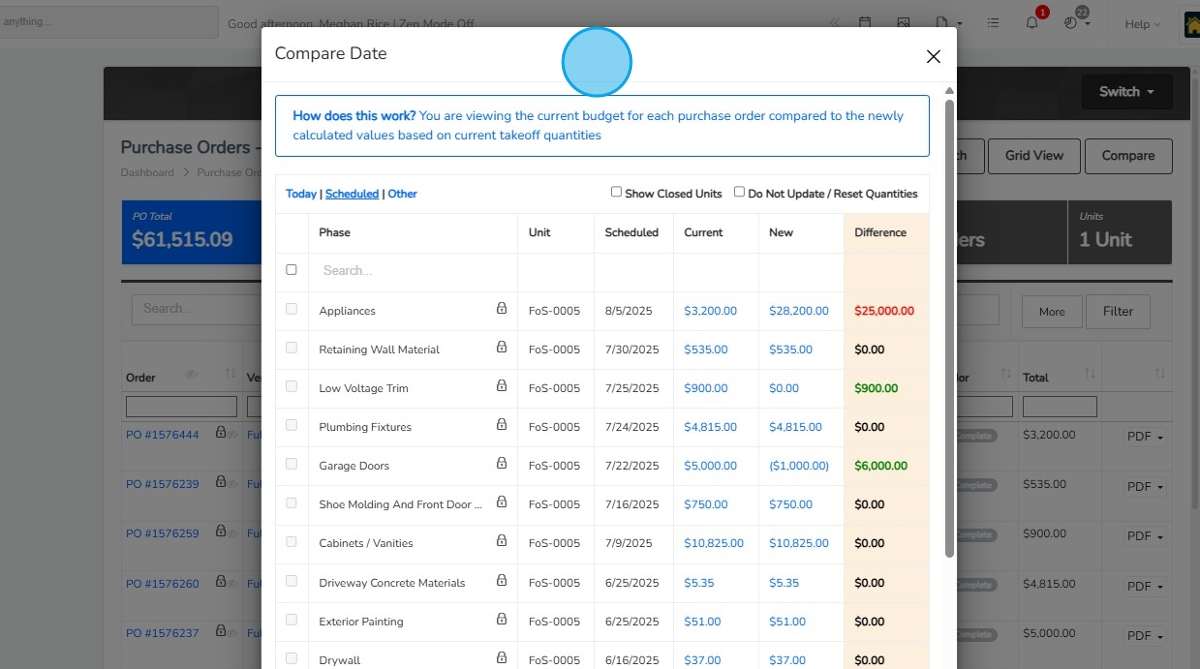
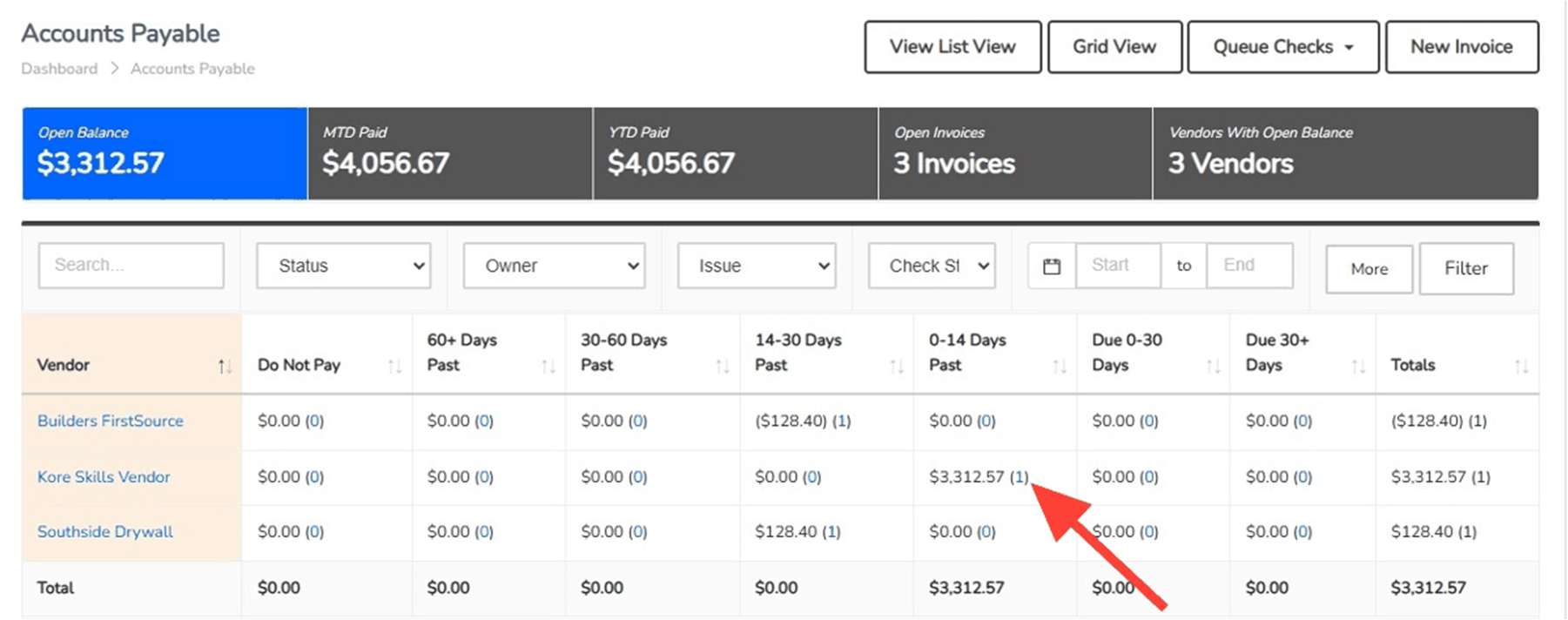
Screens from the supplied ThreadKore training guides. The budget comparison is purchasing context, not a financial statement.
How the work moves between teams.
- Purchasing → Accounting
- Review the home, vendor, scope, price, and supporting PO with the invoice. Investigate budget differences and documented exceptions.
- Construction → Finance
- Bring the home’s stage and milestones into the financial review. Ask which changes in the work need a closer look at cost or expected funding.
- Sales & Design → Finance
- Review the agreed selection, buyer price, and revised scope with the home’s cost outlook. Keep the buyer’s price distinct from the builder’s cost.
The builder’s perspective.
“ThreadKore has been instrumental in tightening our cycle time, protecting our margins, and giving us the ability to scale.”
“Instead of spending time finding information, our team spends time making better decisions. That has allowed us to scale our business while improving consistency and delivering a better experience for our customers.”
ONE PLATFORM, RELEVANT TOOLS
Available tools for your work.
Put the financial story beside the work.BuildingBlocks Available today
Review budgets, commitments, invoices, posted accounting entries, and payments in the context of each home. Projected home margin includes the costs to build, hold, and sell. Anticipate cash needs and expected funding using connected construction and financial information.
- Job budgets and actual costs — Review the expected cost alongside the transactions and commitments behind the job.
- Accounts payable and receivable — Keep payables and receivables in the wider accounting context of the business.
- Financial statements and reporting — Bring the native accounting record into financial reporting and the leadership conversation.
- Transaction detail connected to the job — Return to the home and underlying transaction when a financial result needs explanation.
Know the scope before you commit.Purchasing & PO workflows Available today
Import unit takeoffs, compare budgets, and issue purchase orders with job and vendor context. Document exceptions through variant purchase orders, approval levels, reasons, and back charges.
- Takeoff imports and budget updates — Import unit takeoffs and compare current quantities and pricing with the budget before updating it.
- PO quantities, prices, vendors, and unit context — Record the vendor, home, scope, quantity, and price on the purchase order.
- Budget comparison and linked invoices — Compare PO budgets and open associated invoices from the purchasing record.
- VPO reasons, approval levels, and back charges — Document the reason for an exception and retain its approval and back-charge context.
Give the invoice a clear path to the ledger.AP Launch Available today
Manage the billing inbox, invoice attachments, allocations, and approvals with the vendor and job in view. Follow the purchasing context through review and posting.
- Billing inbox and queued invoices — Bring incoming documents into the invoice review process through the billing inbox and queue.
- Attachments and split-screen invoice review — Review invoice information alongside its supporting attachment.
- Unit, subdivision, and account allocation — Allocate the invoice to the unit, subdivision, or account that gives the cost its context.
- Approvals, do-not-pay status, and ledger posting — Assign approvers, retain invoices for review when needed, and post the invoice to the ledger.
Keep the receivable connected to the relationship.ARLaunch Available today
Bring billing and accounts receivable into the conversation around the customer, the job, and the financial record.
- Billing and receivables workflows — Bring billing and accounts receivable into the conversation around the customer, the job, and the financial record.
- Customer and job context — Bring billing and accounts receivable into the conversation around the customer, the job, and the financial record.
- Connection to the accounting record — Bring billing and accounts receivable into the conversation around the customer, the job, and the financial record.
Orbit brings intelligence to the connected information.
ThreadKore is the system of record. Orbit analyzes connected operational and financial information to help teams investigate changes and compare records. Orbie supports clients along the way.
Watch the illustrative Orbit walkthroughQuestions from the finance team.
Is accounting native to ThreadKore?
Yes. BuildingBlocks provides native accounting, job costs, commitments, and financial reporting inside ThreadKore. Purchasing and AP workflows provide the operational context behind the financial record.
What belongs in projected home margin?
Projected home margin includes the costs to build, hold, and sell the home. Review the budget, commitments, invoices, and projection together as work is recorded. A projection supports decisions; it does not guarantee profit.
Does an invoice mean the vendor has been paid?
No. A commitment records agreed work or a purchase. An invoice is the vendor’s bill. Posting records its accounting effect; a payment is a separate transaction. Review each record’s status before drawing a conclusion about cash.
How does ThreadKore help with cash planning?
Anticipate cash needs and expected funding using connected construction and financial information. Bring a funding question to the demo and review the relevant workflow with the team.
What does residual WIP on a closed or cancelled home mean?
It is a reason to investigate the supporting costs, job status, and accounting treatment. Review the detail with the responsible accountant. Resolving a balance does not automatically release cash.
Is the Alder & Stone example a production screen?
No. It is an interactive, fictional financial model with sample journals, homes, invoices, and payment records. It illustrates a review from balance to transaction. Actual ThreadKore guide screenshots are labeled separately below.