
FOR SALES & DESIGN
Turn the buyer’s choices into a home your team can deliver.
You are helping buyers make decisions while protecting the agreement your team has to build. ThreadKore keeps plans, selections, pricing, change approvals, and signatures in the home’s record, so a buyer conversation can become a clear handoff to purchasing and construction.
The promise to the buyer has to reach the people building the home.
Which choices are final?
Choices evolve across conversations and appointments. It takes work to establish what the buyer actually selected.
Organize plans, packages, design categories, and selections in theHOMESapp. Finalize the design sheet to preserve the agreed choices; later revisions follow the change-order process.
What has the buyer agreed to?
A requested change has a price, approvals, and a contract impact. Interest in an option is not the same as agreement.
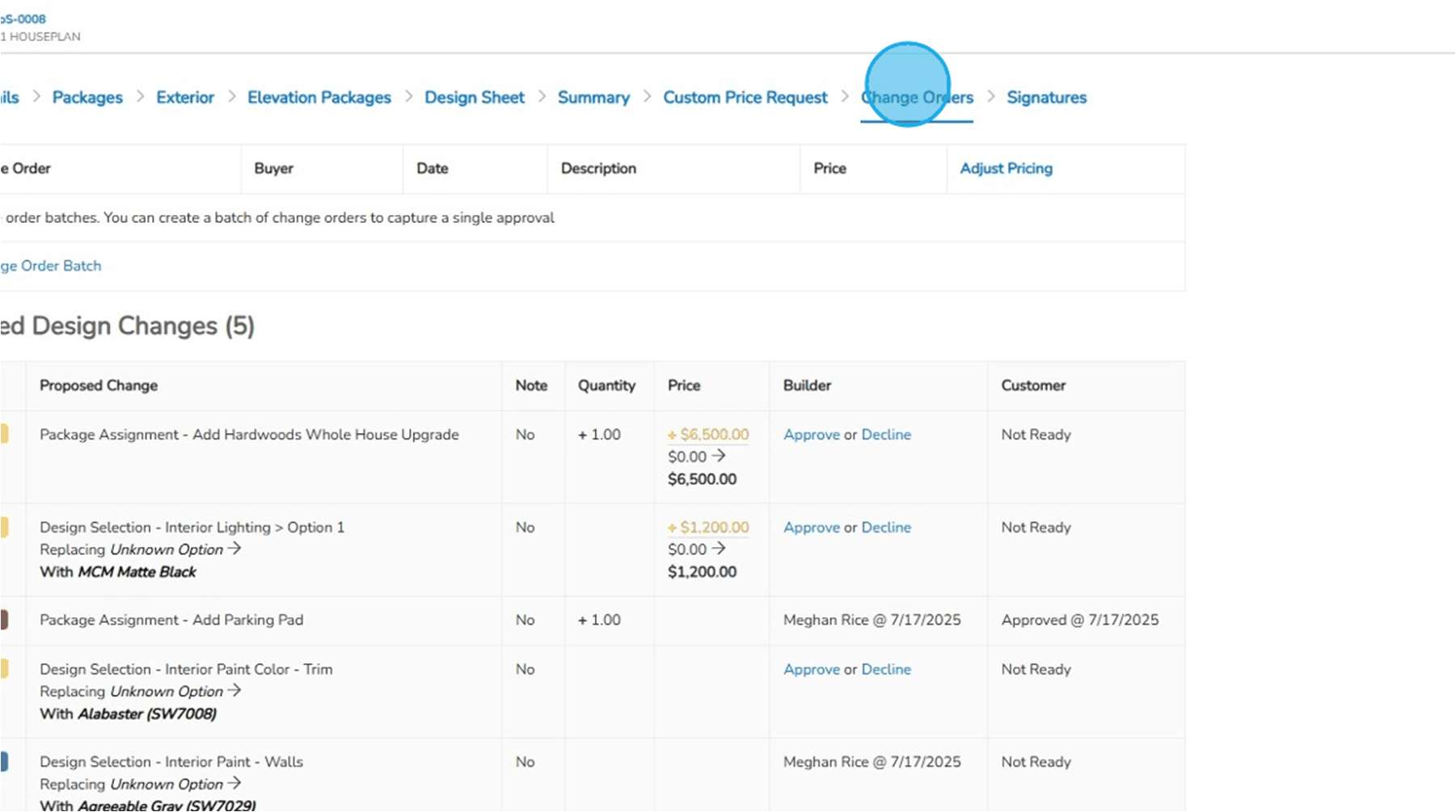
Review proposed changes, quantities, prices, and builder and customer approval status. Group changes into a batch and capture the required signatures.
What does the next team need?
Once the buyer agrees, purchasing and the field still need the precise scope—not another version of the conversation.
Use approved, finalized changes for the pricing and budget update, then review scope with purchasing and construction. Keep the buyer’s retail price distinct from the builder’s cost.
WORKING EXAMPLES
Start with a business question.
Follow a question from problem to decision.
Illustrative walkthroughs · Sample data.
01What changes when a buyer changes a selection?
The problem
Requested selection
A different kitchen finish affects the buyer’s price, the purchasing scope, and the home’s expected cost.
ILLUSTRATIVE EXAMPLE
- Home
- Lot 42
- Original cost allowance
- $8,000
- Revised selection cost
- $9,200
What you do in TK
Review before committing
Record the choice in the home’s design and pricing context. Review pricing and approval, then update the scope and purchasing records for the agreed work.
ILLUSTRATIVE EXAMPLE
- Buyer price
- Review separately from cost
- Approval
- Document the agreed change
- Purchasing
- Review revised scope
What you see
Follow the change
Follow the selection into purchasing, construction context, and job cost. The cost difference remains visible alongside the budget; a commitment is not a payment.
ILLUSTRATIVE EXAMPLE
- Cost difference
- +$1,200
- Field execution
- Use the agreed scope
- Job-cost review
- Compare with the budget
The decision it supports
Agree the handoff
Confirm the buyer’s agreement, coordinate the revised work, and review whether the change affects the home’s expected margin.
ILLUSTRATIVE EXAMPLE
- Sales / design
- Confirm the choice and price
- Purchasing / construction
- Coordinate the revised work
- Finance
- Review the margin effect
ACTUAL PRODUCT SCREENS
See the records your team works with.
This change-order screen from the supplied training guide shows proposed choices, quantities, prices, and separate builder and customer approval states.
Product information to support the conversation.
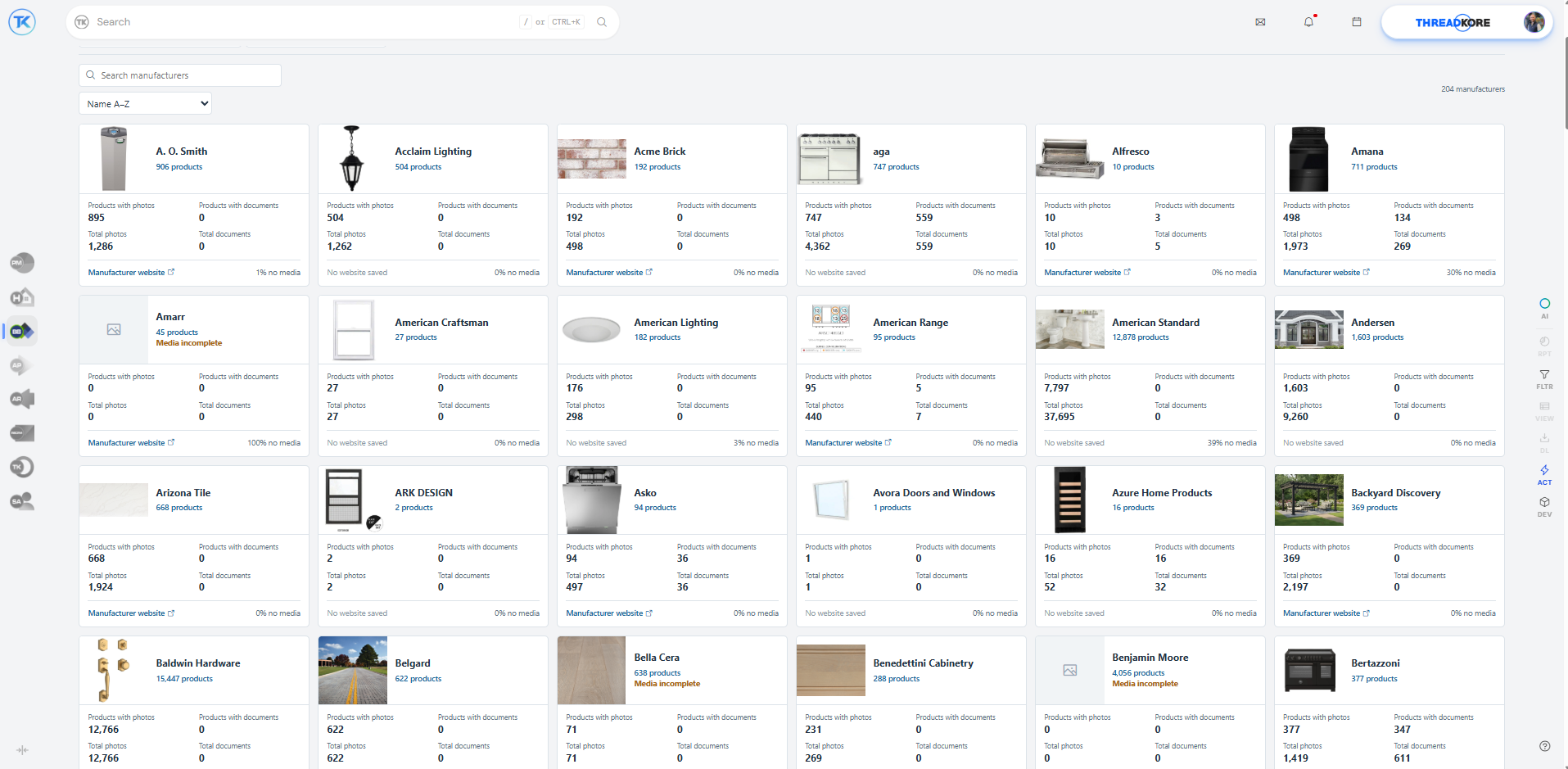
ThreadKore’s product library brings manufacturer information and imagery into view. Search manufacturers and review product, photo, and document availability.
How the work moves between teams.
- Sales & Design → Purchasing
- Pass on the agreed selection and finalized change, including scope and pricing context. Purchasing reviews the quantities and cost before committing the work.
- Sales & Design → Construction
- Keep the approved choice and home record available for coordination. Resolve pending decisions so the team can distinguish a request from agreed work.
- Sales & Design → Finance
- Bring the buyer’s agreed price and the revised scope into the margin discussion. Finance reviews the builder’s cost impact separately from the retail price.
The builder’s perspective.
“Since moving to ThreadKore, we've had far more visibility into our data and processes than ever before, helping us reduce cycle times, uncover efficiencies, and gain new insights.”
“Instead of spending time finding information, our team spends time making better decisions. That has allowed us to scale our business while improving consistency and delivering a better experience for our customers.”
ONE PLATFORM, RELEVANT TOOLS
Available tools for your work.
Keep the buyer’s promise connected to the build.theHOMESapp Available today
Bring Guided Start, plans, design sheets, retail pricing, and signatures together. Document selection changes so the team can follow what was decided and approved.
- Guided Start, plans, and packages — Organize the home’s plan and package choices before committing the work.
- Design sheets and retail price history — Keep design categories and choices with their retail pricing and price history.
- Finalized selections and proposed design changes — Finalize decisions and use the proposed-change process for subsequent changes.
- Change-order batches and contract signatures — Group proposed changes and capture approval/signature records around the home.
Make every choice clear. Keep the build in step.Design Center Available today
Guide buyers through the finishes, options, and packages that make a home their own. Within theHOMESapp, your team can organize design selections, show available option images, review retail pricing, and document approved decisions. Keep those choices with the home so purchasing and construction can work from the agreed scope.
- Organized selections and packages — Group selections into design categories and configure which choices appear for the home and its selected packages.
- Option images and vendor context — Use supplied product images to make choices easier to understand. Design options are configured with the assigned vendor’s information.
- Retail pricing alongside the choice — Review the retail pricing for selections and packages, keeping the buyer’s price distinct from vendor cost.
- Documented decisions and approvals — Finalize the design sheet with the approver’s name and capture additional signatures where needed. Subsequent changes follow the proposed-change and approval process.
- Changes carried into the build — Review selection changes in change-order batches. Approval and finalization are separate steps; finalization updates budget and list-price details so the next team can review the agreed change.
Know the scope before you commit.Purchasing & PO workflows Available today
Import unit takeoffs, compare budgets, and issue purchase orders with job and vendor context. Document exceptions through variant purchase orders, approval levels, reasons, and back charges.
- Takeoff imports and budget updates — Import unit takeoffs and compare current quantities and pricing with the budget before updating it.
- PO quantities, prices, vendors, and unit context — Record the vendor, home, scope, quantity, and price on the purchase order.
- Budget comparison and linked invoices — Compare PO budgets and open associated invoices from the purchasing record.
- VPO reasons, approval levels, and back charges — Document the reason for an exception and retain its approval and back-charge context.
Orbit brings intelligence to the connected information.
ThreadKore is the system of record. Orbit analyzes connected operational and financial information to help teams investigate changes and compare records. Orbie supports clients along the way.
Watch the illustrative Orbit walkthrough