Start with the big picture.
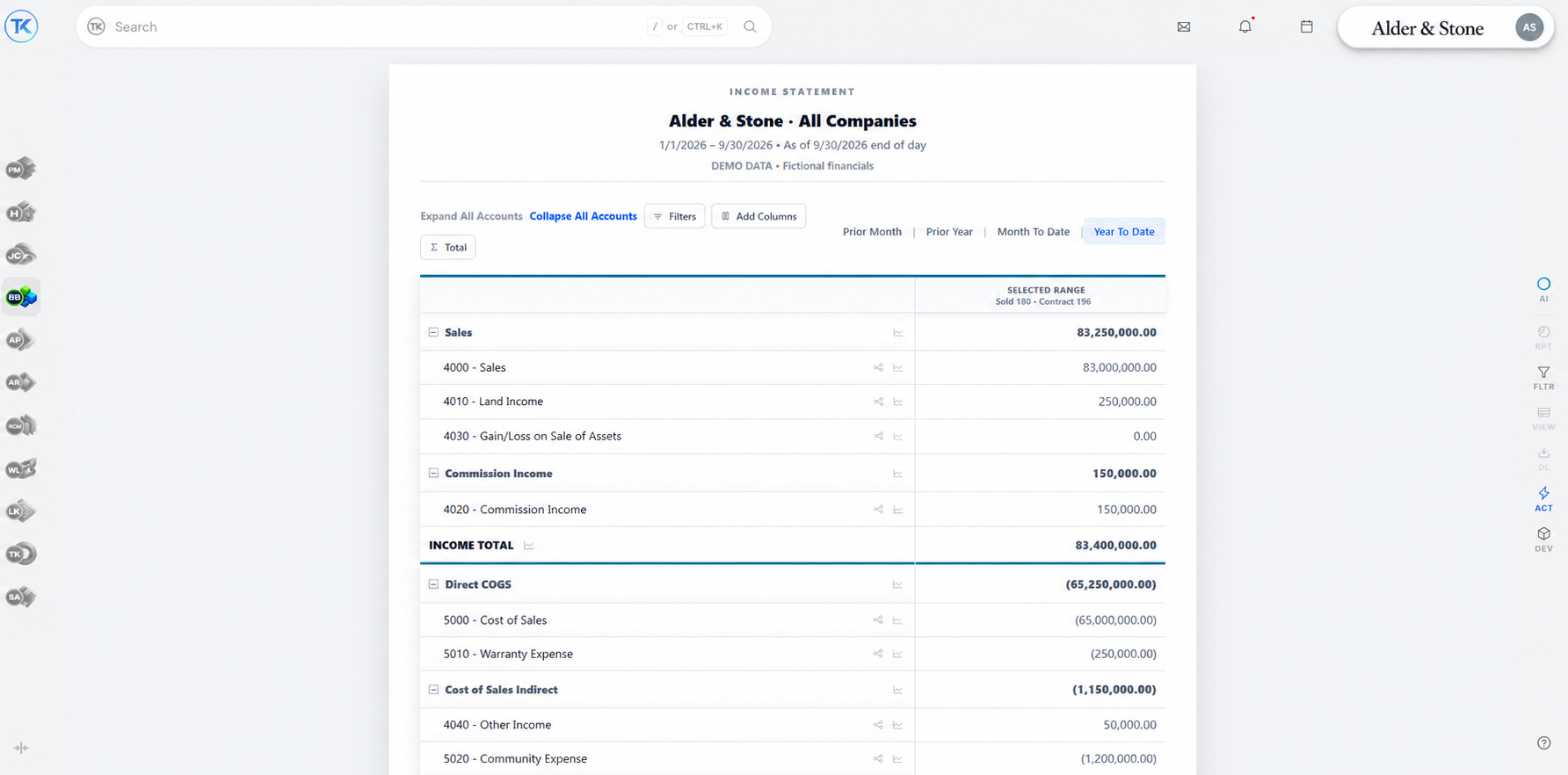
Review income and costs in an expandable financial statement. Choose your reporting period and explore the accounts behind your results.

Accounting & job costs
Run native accounting alongside land development and home construction.
BuildingBlocks is ThreadKore's native homebuilder accounting: the general ledger is part of the platform, not a separate accounting package connected by integration. It covers multi-company and intercompany accounting, land and lot inventory, capitalization of construction costs into construction in progress (CIP) with cost relief at closing, work in progress (WIP), revenue recognition, closing entries, accounts payable and receivable, bank reconciliation, payroll, month-end close, and consolidated financial statements. No QuickBooks required.
Trace budgets, purchase commitments, invoices, posted costs, and payments through the same connected financial record.
Understand the big picture—and the numbers behind it. BuildingBlocks lets you expand your income statement by market, community and individual home, review transaction history, and open the underlying general-ledger entry without leaving the financial workspace.
Edited interface illustrations based on ThreadKore product screenshots. All company details, transaction references and financial figures shown are fictional demonstration data.
Review income and costs in an expandable financial statement. Choose your reporting period and explore the accounts behind your results.
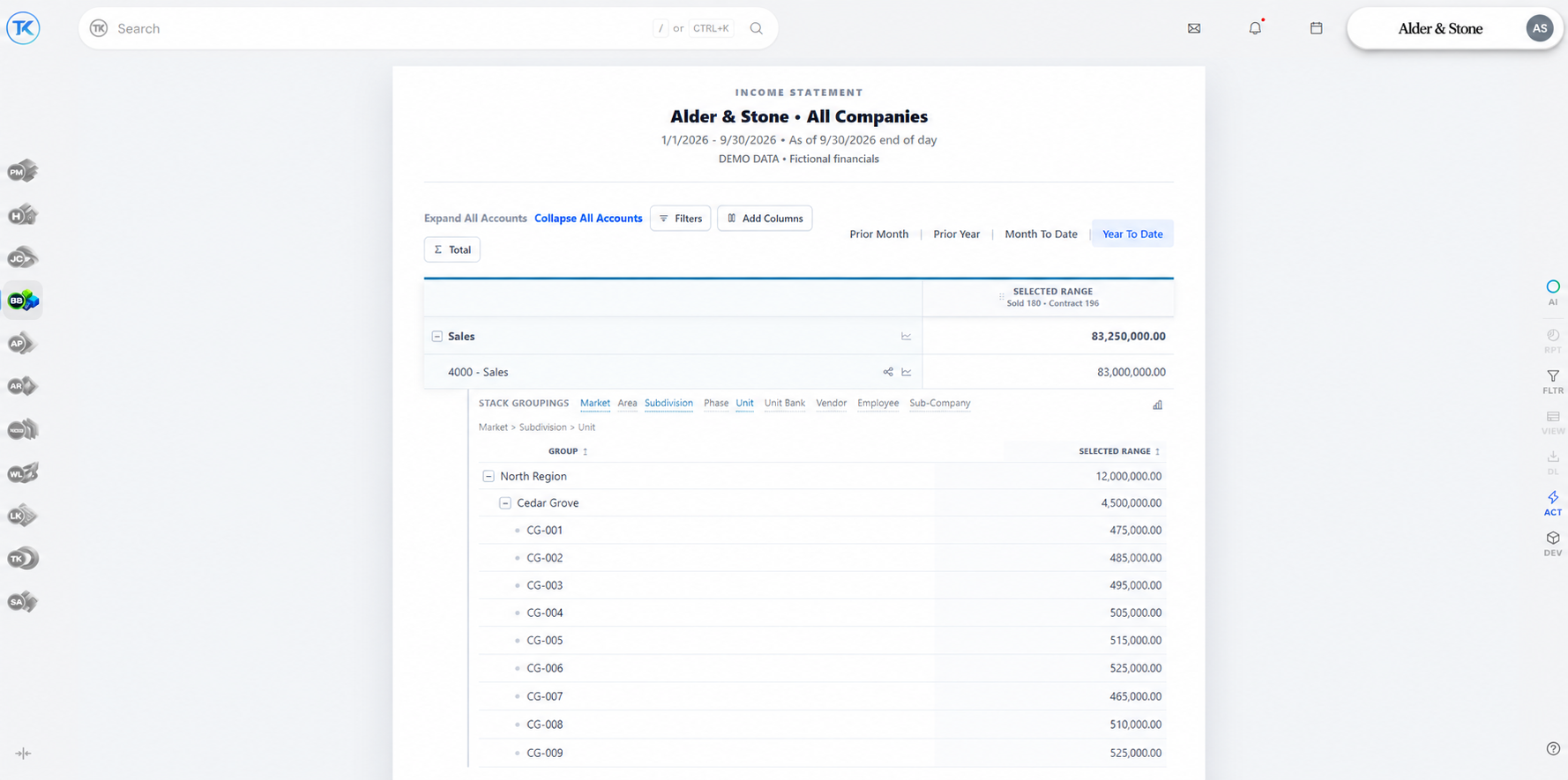
Drill into a market, community or individual home directly within the statement. Keep the account total visible while exploring its supporting detail.
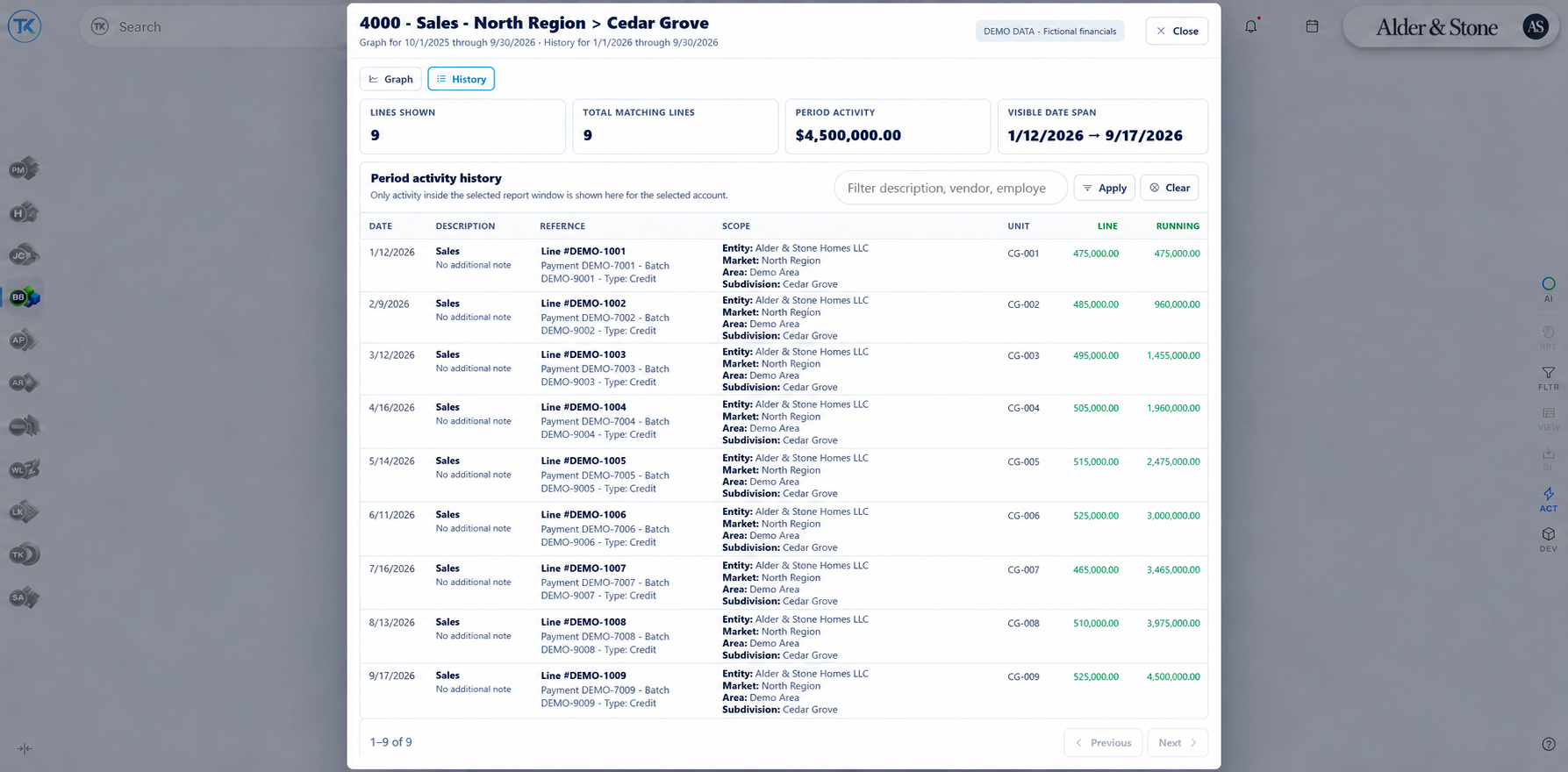
Inspect transaction dates, references, home assignments, individual amounts and running totals.
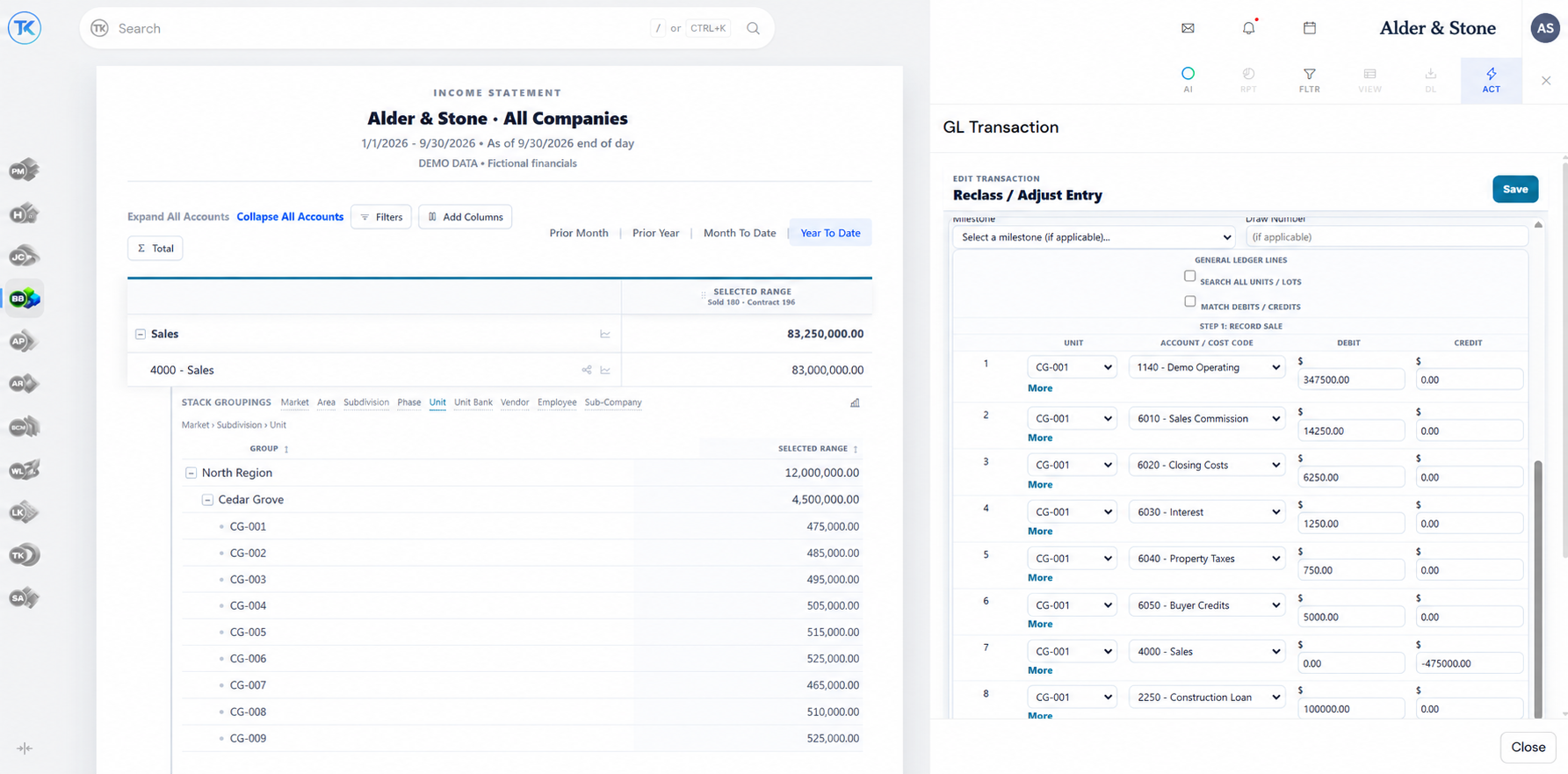
Open the underlying general-ledger entry alongside the financial statement. Review the accounts, home allocation, debits and credits while keeping the report in view.
Yes. BuildingBlocks, ThreadKore’s accounting application, supports expanding income-statement accounts into grouped detail, including market, community and individual home. Users can review activity history and open the underlying general-ledger transaction within the same financial workspace.
Yes. The GL transaction panel opens alongside the income statement, keeping the report and expanded detail visible while users inspect the entry. Account detail expands inline, and activity history opens in an overlay.
No. These edited interface illustrations use fictional Alder & Stone company details and financial data to demonstrate the workflow.
Explore the detail behind your financials without leaving the report workspace.
See financial drill-through in action.Yes. BuildingBlocks, ThreadKore’s native accounting application, provides a bank-reconciliation workspace for comparing bank statement activity with ledger entries. The workflow includes suggested transaction matches, amount/date/check-reference comparisons, and selection of multiple ledger entries against a single bank transaction. Users review the proposed match before confirming it.
Edited interface illustrations based on ThreadKore product screenshots. Company details and financial data are fictional.
Start with the account and statement period. The workspace places bank amounts, ledger amounts, candidate matches and reconciliation status together for review.
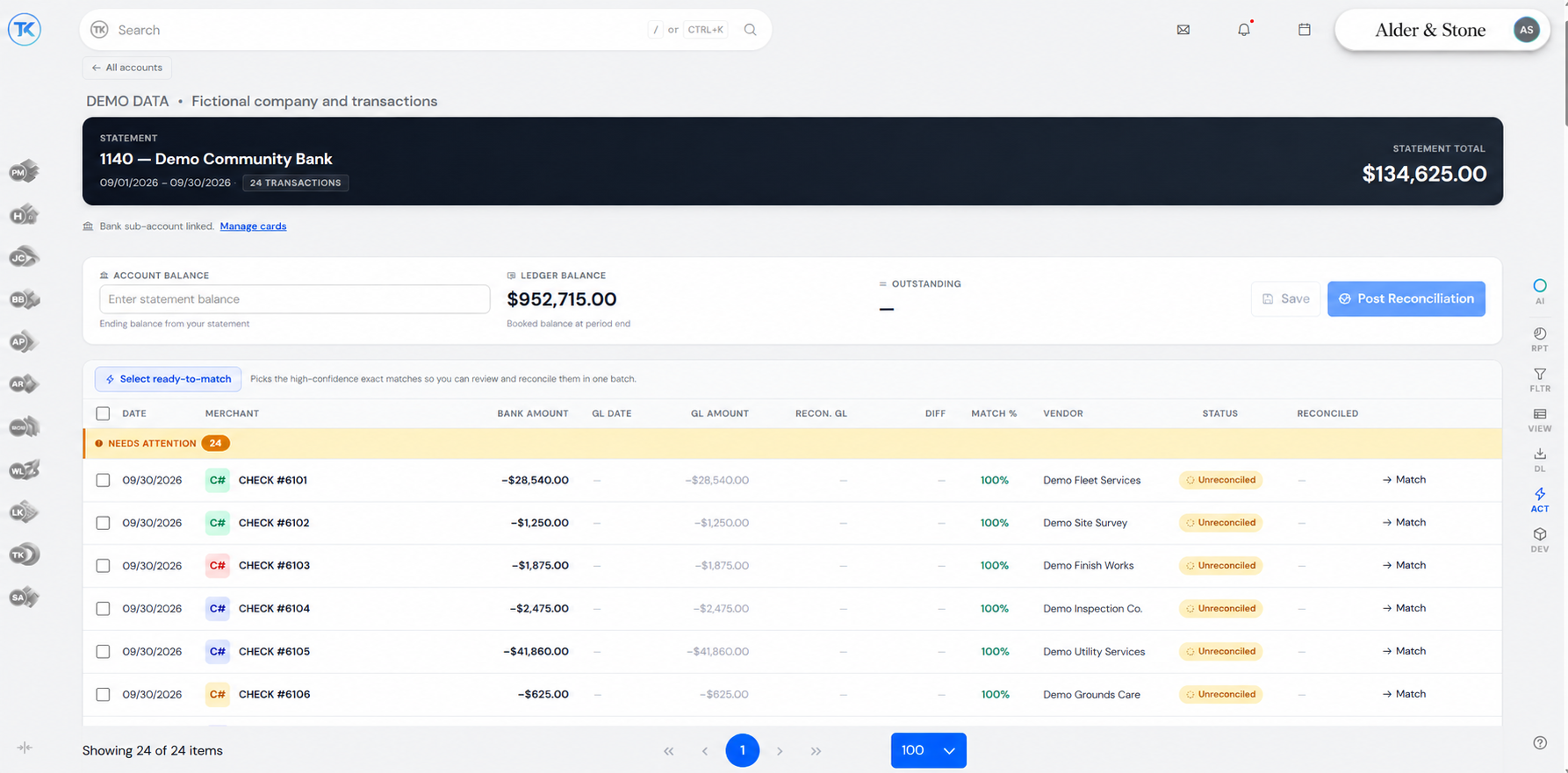
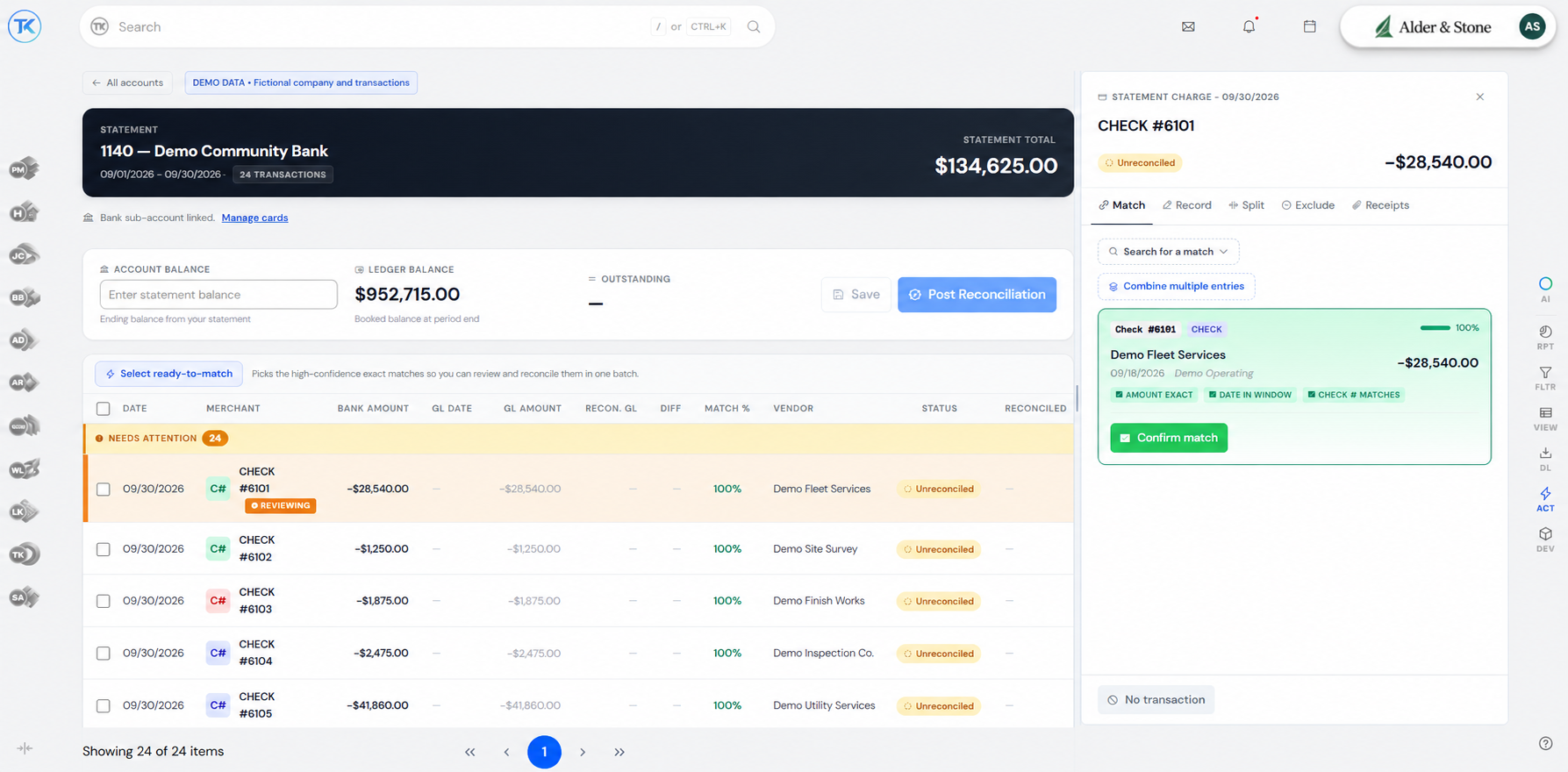
Open a transaction to inspect the proposed ledger match. The example displays amount, date-window and check-number comparisons before the user chooses Confirm match.
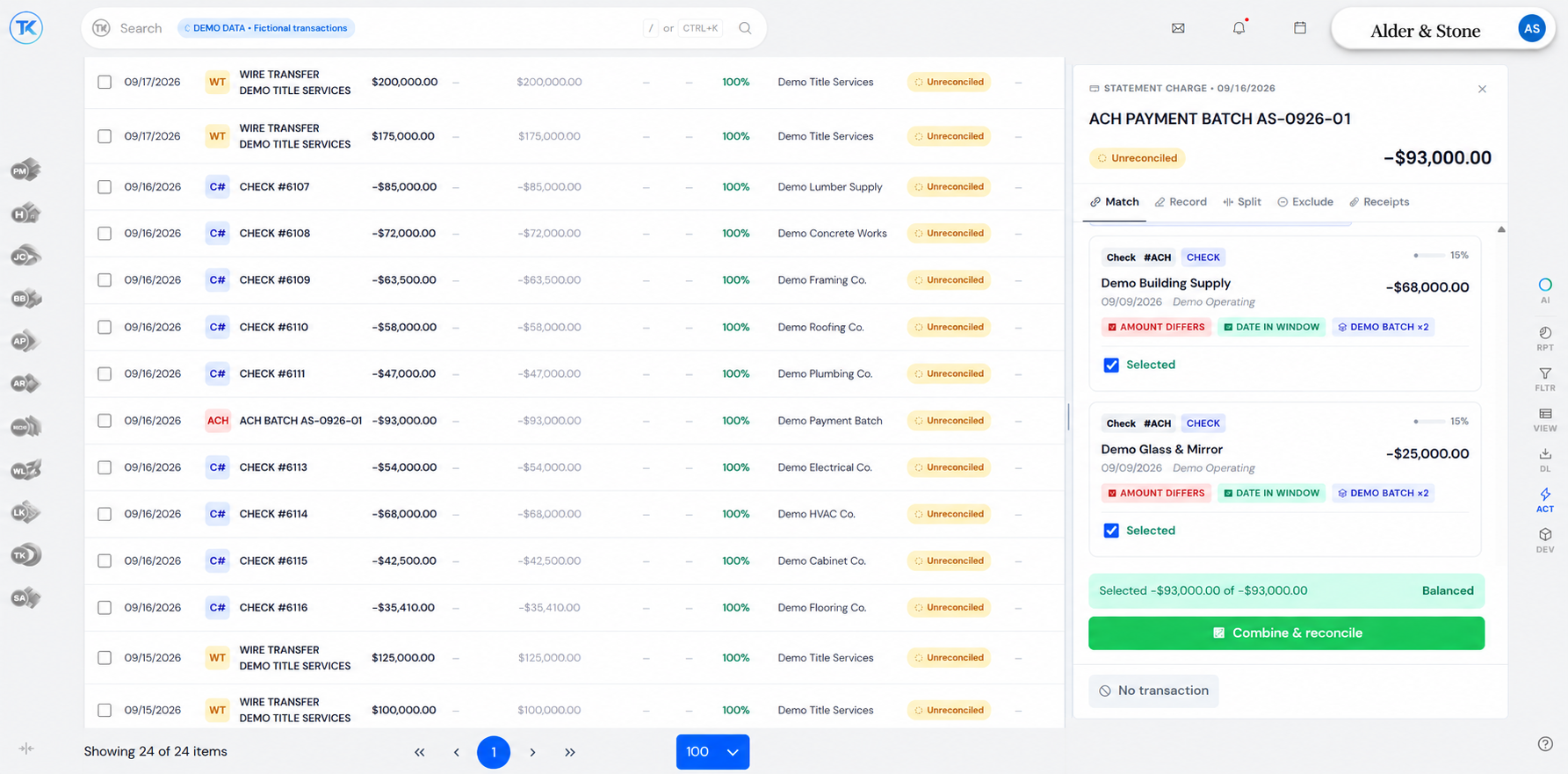
When one withdrawal represents several payments, select the corresponding ledger entries and review their combined amount against the bank transaction.
Yes. BuildingBlocks, ThreadKore’s native accounting application, provides a bank-reconciliation workspace for comparing bank statement activity with ledger entries. The workflow shown here includes suggested transaction matches, amount/date/check-reference comparisons, and selection of multiple ledger entries against a single bank transaction. Users review the proposed match before confirming it.
Yes. The combined-entry workflow lets a user select multiple ledger entries and compare their total with one bank transaction. In this fictional example, payments of $68,000 and $25,000 total the $93,000 bank withdrawal. The screen displays the selected total and a Combine & reconcile action.
The percentage is a transaction-match indicator shown alongside the candidate details. It is not the reconciliation difference or a guarantee that the entire bank account is reconciled. In a combined-payment match, individual amounts may differ while the selected entries together equal the bank transaction.
No. These are edited interface illustrations based on supplied ThreadKore product screenshots. Alder & Stone, the account references, counterparties and financial amounts are fictional demonstration data.
Ask to follow a reconciliation from transaction matching through adjustments, outstanding items and the saved result. Bring requirements for bank fees, interest, deposits in transit, outstanding checks, period controls and reconciliation reports. The illustrations on this page show the matching and review stages; they do not show a completed account reconciliation.
Review the matching workflow, then ask to see adjustments, outstanding items and the saved reconciliation result using a demonstration account.
Native accounting and job-cost capabilities, included in BuildingBlocks.
Trace budgets, purchase commitments, invoices, posted costs, and payments through the same connected financial record.
The everyday workflow
The role it plays
Its contribution to the record
Budgets and commitments remain distinguishable from posted costs and payments.
How it complements the platform
BuildingBlocks connects MyPM land-development costs and theHOMESapp vertical-construction commitments, actual costs and projections to the native general ledger.
Understand the business behind the numbers.
Yes. BuildingBlocks is the system of record; no QuickBooks or separate accounting system is required.
Yes. Every home carries budget, commitments, actual cost and forecast at completion, and reporting rolls up by community, market, company and across entities.
Yes. WIP and revenue recognition come from the same general ledger as job cost.
Yes. Each is handled natively in the general ledger, with consolidated financial statements across entities.
Yes. QuickBooks migration is a standard part of implementation, reconciled before go-live.
Yes.
Questions about BuildingBlocks
On one record. Buyer changes update pricing, purchase commitments and the job budget immediately. Invoices and transactions post to the native general ledger once approved, so your team keeps approval control without re-keying or syncing between systems.
Available today. Review your workflow in a focused demonstration.
BuildingBlocks includes native general ledger, accounts payable and accounts receivable, bank reconciliation, payroll, budgets, committed costs, actual costs, forecast at completion, work in progress (WIP), construction draws, deposits and closing revenue, land and lot cost allocation to individual homes, multi-entity reporting, financial statements, and period-end close. Trace budgets, purchase commitments, invoices, posted costs, and payments through the same connected financial record.
Make the conversation specific
Review the workflow with your team in a focused demonstration.
Explore the financial story of a job ↗FROM THE THREADKORE PRODUCT GUIDES
Actual interface images from supplied training materials. Historical guide examples; amounts are not customer performance claims and the current interface may differ.
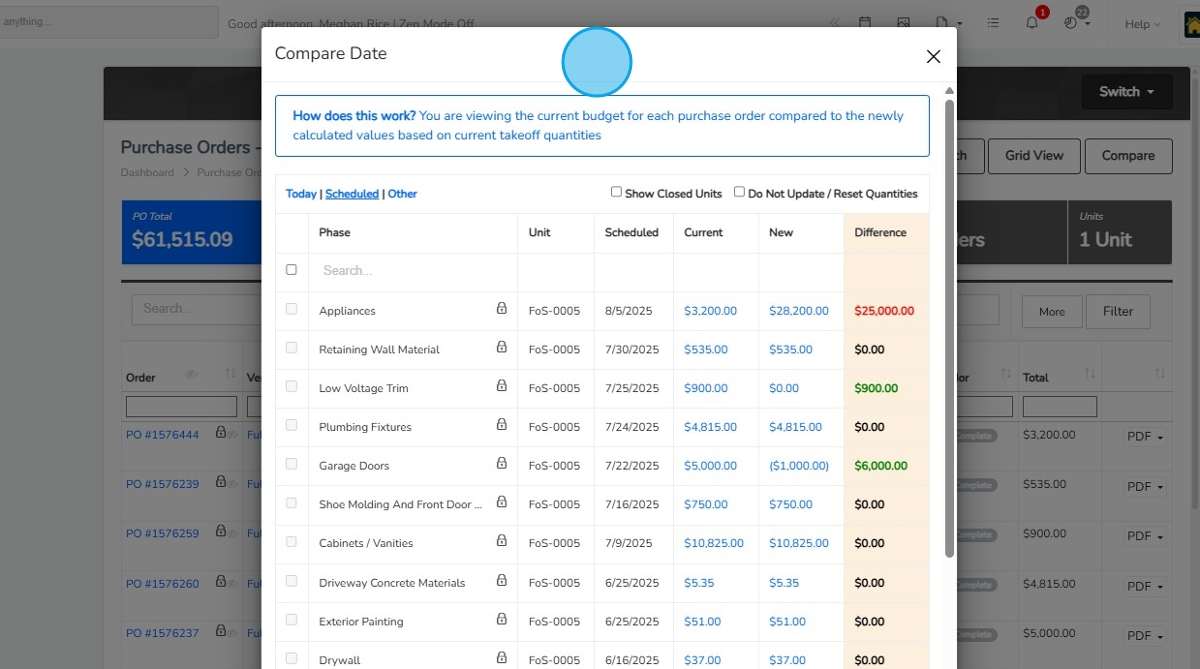
Moving from Sage 300 CRE? Coming from NEWSTAR? Compare accounting and job-cost workflows.