
FOR PURCHASING & ESTIMATING
Commit to the right scope. Understand every change in cost.
You are expected to protect the budget while plans, buyer choices, vendor prices, and field conditions keep moving. ThreadKore ties takeoffs and purchasing to the home, so you can review what changed before committing the work—and keep the reason with the cost.
The estimate is only the beginning of your responsibility.
What are we actually committing to?
A revised plan or vendor price arrives, but the takeoff, budget, and purchase order may no longer tell the same story.
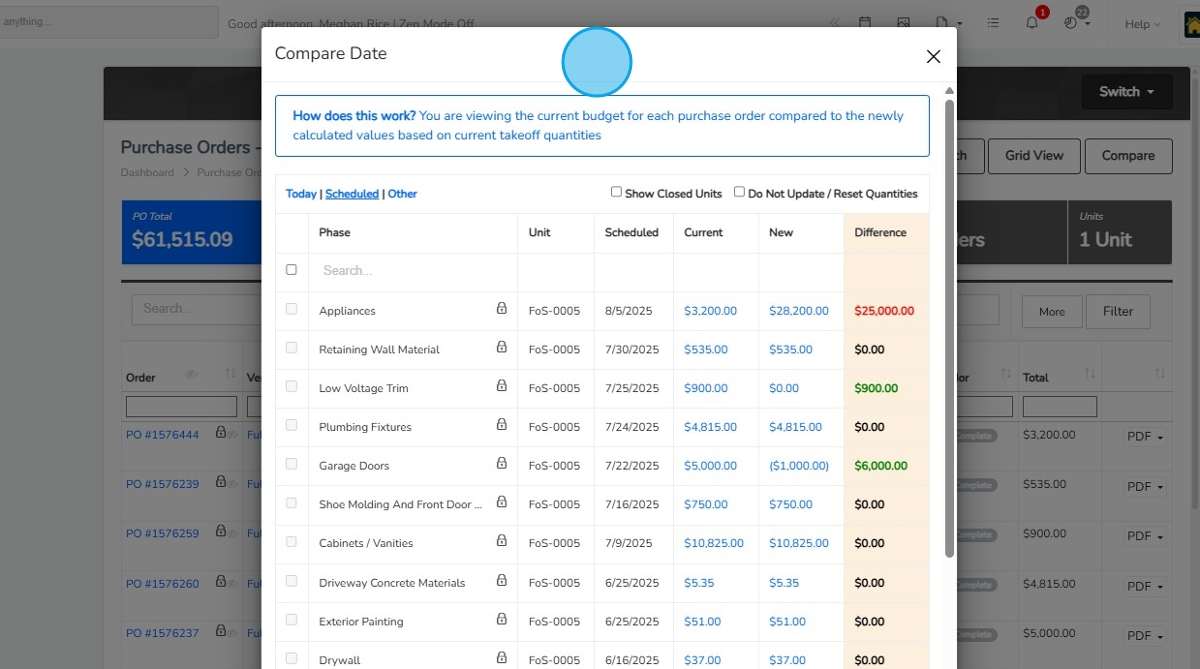
Import unit takeoffs and compare current budgets with recalculated quantities and prices. Review the differences before updating the budget and corresponding POs.
Why did this job need more?
The field needs extra work. Later, you have to explain why it was needed, who approved it, and what it changed.
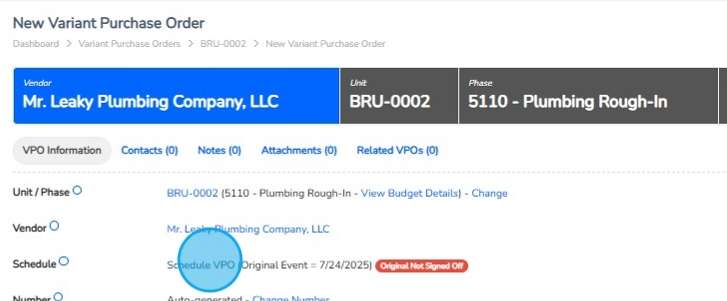
Document a variant purchase order with its reason, home, vendor, and approval. Review approved variants alongside the current budget instead of losing the explanation in an email.
Does the bill match the work?
An invoice reaches accounting without the scope and purchasing context needed to review it.
Keep the vendor, unit, quantities, prices, and linked invoices with the PO. Give accounting a purchase commitment to compare with the bill; approval and payment remain separate steps.
WORKING EXAMPLES
Start with a business question.
Follow a question from problem to decision.
Illustrative walkthroughs · Sample data.
01What changed between the takeoff and the purchase order?
The problem
A revision needs review
A revised takeoff changes the quantities or prices for a home. Releasing work from an older budget can leave purchasing and the field working from different expectations.
ILLUSTRATIVE EXAMPLE
- Home
- Lot 42 · illustrative
- Change
- Revised takeoff
- Question
- What changes in the commitment?
What you do in TK
Compare before updating
Import the unit takeoff and open the budget comparison. Review the current and recalculated amounts by phase and vendor. Choose the changes to apply before updating the budget and corresponding purchase orders.
ILLUSTRATIVE EXAMPLE
- Review
- Phase and vendor
- Compare
- Current and recalculated amounts
- Confirm
- Quantities and pricing to use
What you see
Keep the reason with the cost
The purchase order retains the home, vendor, quantities, and prices. If later work needs a variant, record its reason and approval; approved variants appear in the budget context.
ILLUSTRATIVE EXAMPLE
- Purchase order
- Agreed scope and cost
- Variant
- Documented exception
- Budget review
- Approved changes in context
The decision it supports
Resolve before releasing
Decide whether the revised takeoff is ready to commit or needs a scope or vendor-pricing review. Use the documented difference to inform the next estimate, and give accounting the PO context when an invoice arrives.
ILLUSTRATIVE EXAMPLE
- Confirm
- Correct scope and pricing
- Coordinate
- Vendor and field handoff
- Learn
- Review the cause for the next estimate
ACTUAL PRODUCT SCREENS
See the records your team works with.
Compare the budget before committing changed work, then keep an exception in the home’s purchasing record. Screens are from the supplied ThreadKore training guides.
Product information to support the conversation.
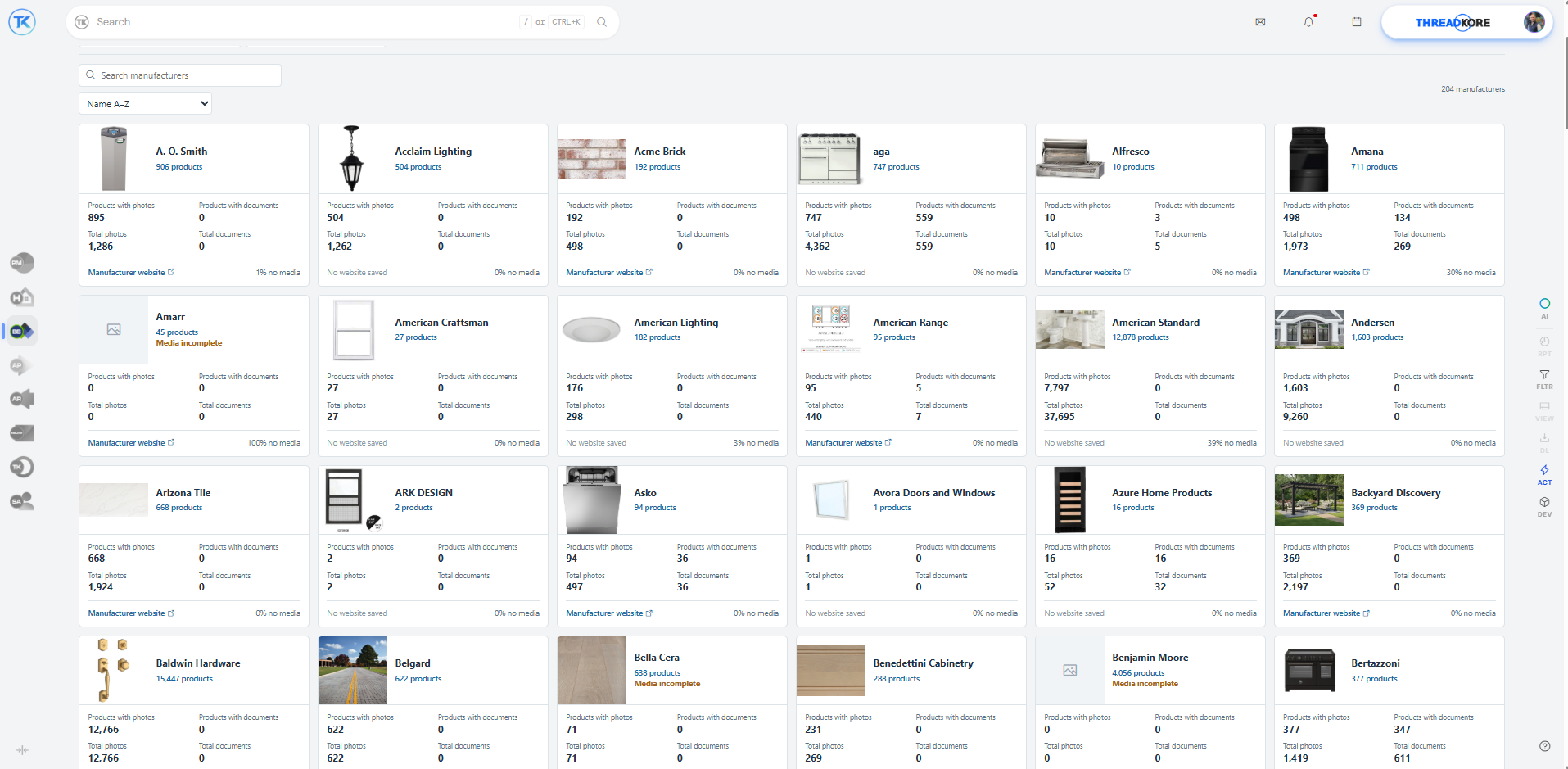
ThreadKore’s product library brings manufacturer information and imagery into view. Search manufacturers and review product, photo, and document availability.
How the work moves between teams.
- Sales & Design → Estimating
- Start with the documented plan, packages, and approved selection changes. Confirm the scope before updating takeoffs or purchase commitments.
- Purchasing → Construction
- Provide the home, vendor, scope, and PO context. Record extra work through the variant and approval process so the field and purchasing can review the same exception.
- Purchasing → Accounting
- Make the commitment and its supporting detail available for invoice and job-cost review. A PO commits work; an invoice, posting, and payment each have their own status.
The builder’s perspective.
“Since moving to ThreadKore, we've had far more visibility into our data and processes than ever before, helping us reduce cycle times, uncover efficiencies, and gain new insights.”
“It has greatly enhanced our operations by improving the accuracy of our reporting and seamlessly aligning our purchasing and billing systems.”
ONE PLATFORM, RELEVANT TOOLS
Available tools for your work.
Define scope, price the work and control commitments.Purchasing & PO workflows Available today
Purchasing and estimating teams connect takeoffs, budget comparisons, vendor pricing, POs and VPOs within theHOMESapp vertical-construction workflow.
- Takeoff imports and budget comparisons
- PO vendor, home, quantity and price records
- Linked invoices and purchasing support
- VPO reasons, approval levels and back charges
Every home. Every commitment. One connected workflow.theHOMESapp Available today
Manage vertical construction from design selections and contracts through estimates, takeoffs, purchasing, and scheduling. theHOMESapp brings the work, commitments, cash flow projections, and bank borrowing projections together in one place, connected to ThreadKore’s native accounting.
- Guided Start, plans, and packages — Organize the home’s plan and package choices before committing the work.
- Design sheets and retail price history — Keep design categories and choices with their retail pricing and price history.
- Finalized selections and proposed design changes — Finalize decisions and use the proposed-change process for subsequent changes.
- Change-order batches and contract signatures — Group proposed changes and capture approval/signature records around the home.
Control every invoice from intake through posting.AP Launch Available today
Receive invoices in the billing inbox, identify the vendor and job, review attachments and purchase records, route approvals, hold items and post to native BuildingBlocks accounting.
- Billing inbox and queued invoice attachments
- Vendor, job, subdivision and account allocation
- PO support and split-screen document review
- Approval routing, holds and ledger posting
Run the books alongside the work.BuildingBlocks Available today
Native accounting for finance teams and builder leadership: budgets, commitments, actual costs and forecast at completion connect to the land-development and vertical-construction records.
- Native GL, multi-company and intercompany accounting
- Land and lot inventory and cost allocation
- CIP, WIP, revenue recognition and closing cost relief
- AP, AR, bank reconciliation and payroll
- Job budgets, commitments, actuals and forecast at completion
- Month-end close and consolidated financial statements
Orbit brings intelligence to the connected information.
ThreadKore is the system of record. Orbit analyzes connected operational and financial information to help teams investigate changes and compare records. Orbie helps clients use ThreadKore and writes custom reports.
Watch the illustrative Orbit walkthroughConsulting for your team
Get hands-on help with purchasing, trade scopes and job costs.
Explore Consulting ↗