
FOR OWNERS & EXECUTIVES
Lead with a clear view of margin, cash, and the work ahead.
You are making decisions about starts, people, and growth while every department sees a different part of the business. ThreadKore brings the financial result and the work behind each home into one platform, so the next conversation can be about what to do.
You should not have to assemble the business in every meeting.
Will growth protect the margin?
Sales are moving, but you still need to know what each home should earn after the costs to build, hold, and sell it.
Review the home’s expected margin with its budget, commitments, and recorded costs. Investigate what moved before deciding on pricing, scope, or the next start.
Can we support the work ahead?
A strong profit outlook does not answer whether the business can fund the work it is taking on.
Anticipate cash needs and expected funding using connected construction and financial information. Use that context to set operating priorities with finance.
Why does every answer need me?
When sales, purchasing, the field, and finance bring different answers, every exception comes back to you.
Bring the home, its agreed scope, purchase commitments, and financial records into the same review. Give each department a specific record to investigate and a decision to own.
WORKING EXAMPLES
Start with a business question.
Follow a question from problem to decision.
Illustrative walkthroughs · Sample data.
01What should this home earn?
The problem
Expected result
The sale price alone does not tell you what the home should earn. Projected home margin includes the costs to build, hold, and sell the home.
ILLUSTRATIVE EXAMPLE
- Expected sale
- $450,000
- Build, hold & sell costs
- $350,000
- Projected home margin
- $100,000
What you do in TK
Review the movement
Review the home’s budget, commitments, invoices, and projection. Open purchasing and job-cost detail to investigate a change.
ILLUSTRATIVE EXAMPLE
- Original cost outlook
- $350,000
- Revised cost outlook
- $356,400
- Difference to investigate
- $6,400
What you see
Revised expectation
Budgets, commitments, invoices, and projections update together as work is recorded. Compare the revised expectation with the original target, keeping each record’s status clear.
ILLUSTRATIVE EXAMPLE
- Expected sale
- $450,000
- Revised build, hold & sell costs
- $356,400
- Projected home margin
- $93,600
The decision it supports
Choose the next action
Decide whether to revise scope, pricing, purchasing, or the estimate for the next home. A projection supports a decision; it does not guarantee profit.
ILLUSTRATIVE EXAMPLE
- Investigate
- Scope and cost changes
- Compare
- Expectation and current outlook
- Act
- Assign the next review
02When will we need cash?
The problem
Two different questions
A home can be profitable on paper while the business still needs cash to keep work moving.
ILLUSTRATIVE EXAMPLE
- Profitability
- What should the home earn?
- Cash needs
- What needs funding?
- Expected funding
- What is expected to come in?
What you do in TK
Review the business
Review the cash outlook alongside the construction and financial information behind your homes.
ILLUSTRATIVE EXAMPLE
- Construction
- Progress and changes
- Financial records
- Commitments and recorded costs
- Cash outlook
- Needs and expected funding
What you see
Plan with context
Anticipate cash needs and expected funding using connected construction and financial information.
ILLUSTRATIVE EXAMPLE
- Cash needs
- See what requires attention
- Expected funding
- Review the outlook
- Changes
- Investigate with your team
The decision it supports
Make the next decision
Decide which funding conversations and operating priorities need attention before committing to more work. Review the outlook as conditions change.
ILLUSTRATIVE EXAMPLE
- Finance
- Discuss funding needs
- Operations
- Review upcoming work
- Leadership
- Agree priorities
ACTUAL PRODUCT SCREENS
See the records your team works with.
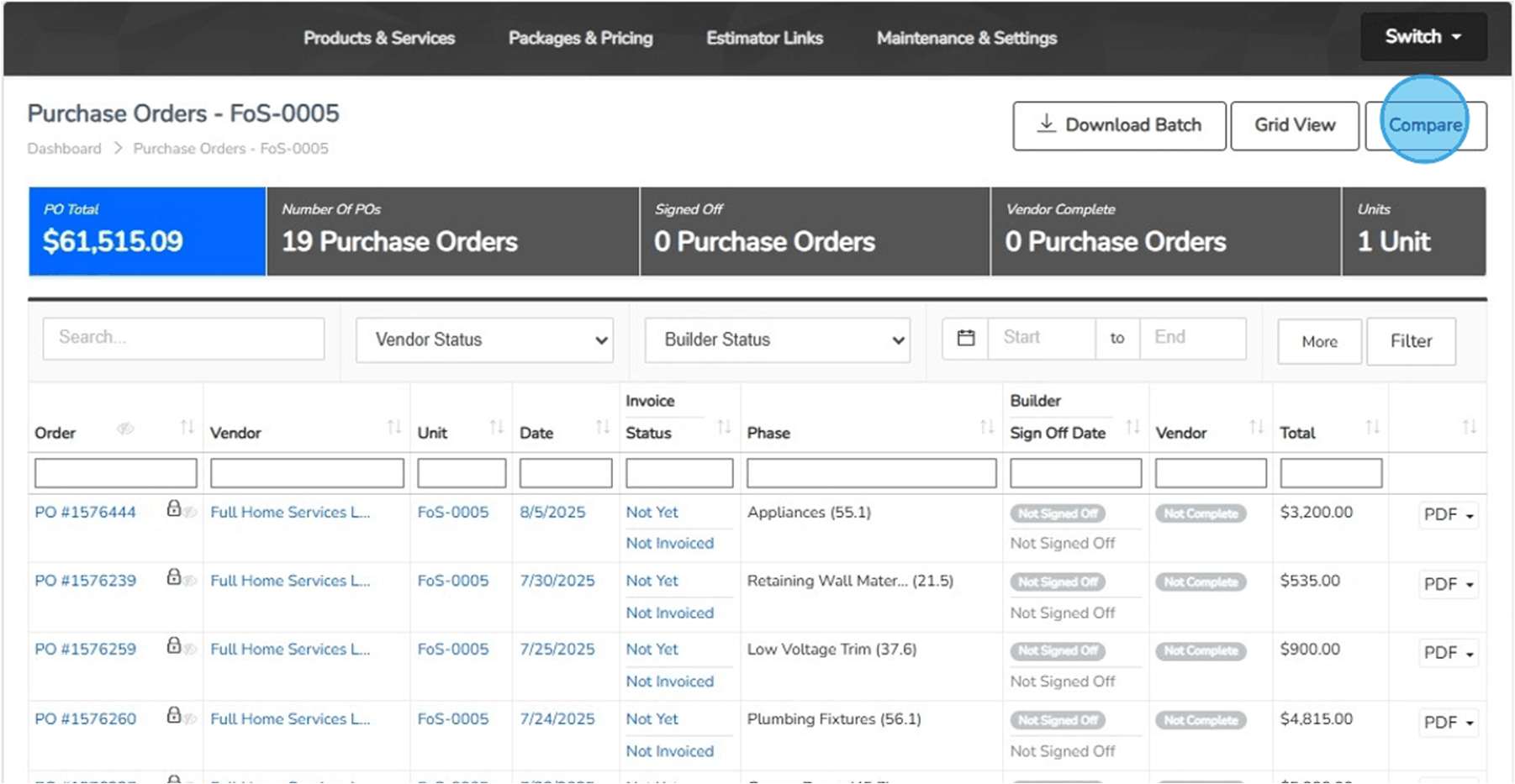
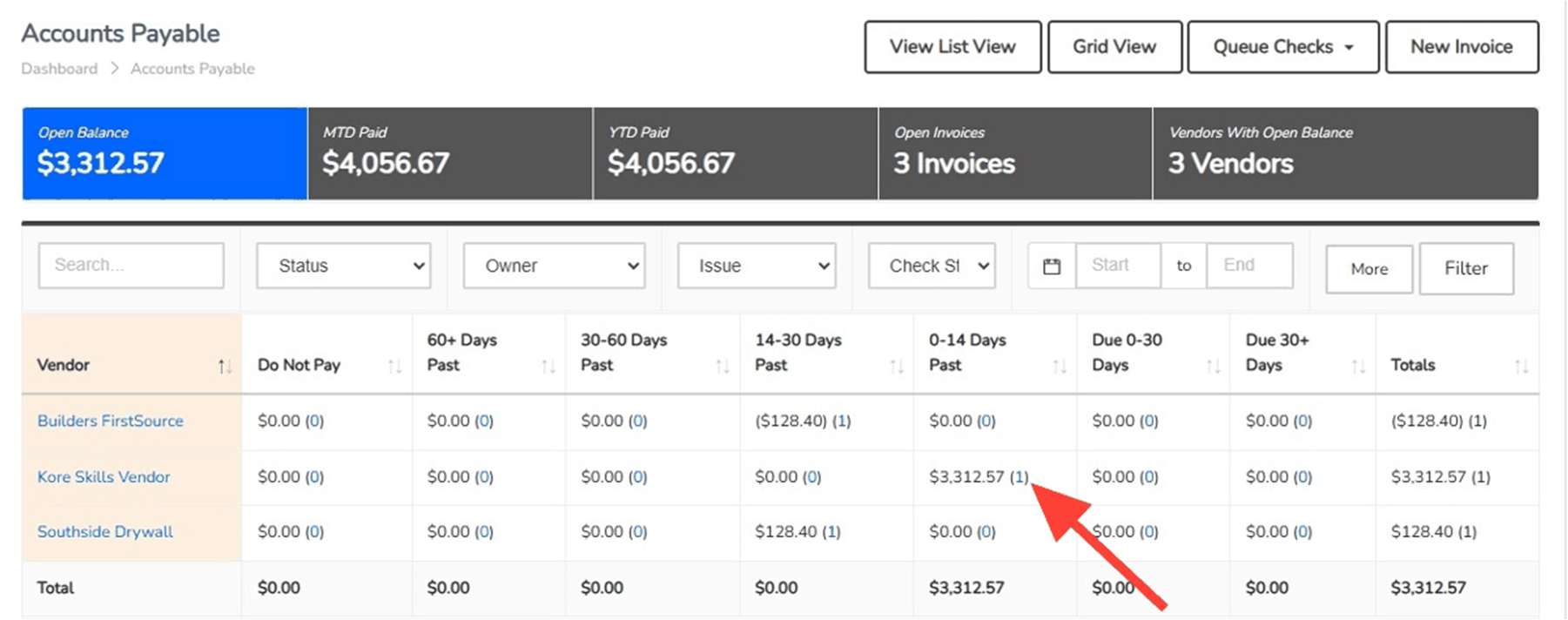
A leadership discussion needs records beneath the summary. These supplied guide screens show purchase commitments and vendor balances your team can investigate.
How the work moves between teams.
- Finance → Leadership
- Bring expected margin, cash needs, and unexplained balances to the review. Identify the question and the supporting records before choosing an action.
- Purchasing & Construction → Leadership
- Explain the scope, cost, or schedule change behind the result. Agree who will review the exception and what decision is needed.
- Leadership → The team
- Set the priority and assign responsibility. Shared information supports the conversation; your team still owns the judgment and follow-through.
The builder’s perspective.
“By bringing every major function, from sales, purchasing, construction, finance, land development, customer care, and executive reporting under one ERP platform, we’ve created a true single source of truth for our organization.”
“ThreadKore brought everything into one place and gives us a much clearer picture of what is happening across the company.”
ONE PLATFORM, RELEVANT TOOLS
Available tools for your work.
Put the financial story beside the work.BuildingBlocks Available today
Review budgets, commitments, invoices, posted accounting entries, and payments in the context of each home. Projected home margin includes the costs to build, hold, and sell. Anticipate cash needs and expected funding using connected construction and financial information.
- Job budgets and actual costs — Review the expected cost alongside the transactions and commitments behind the job.
- Accounts payable and receivable — Keep payables and receivables in the wider accounting context of the business.
- Financial statements and reporting — Bring the native accounting record into financial reporting and the leadership conversation.
- Transaction detail connected to the job — Return to the home and underlying transaction when a financial result needs explanation.
Give every home a shared starting point.MyPM Available today
Organize communities, lots, addresses, and unit records. Keep development milestones and construction context with the home so teams can find the same starting point.
- Subdivision and lot organization — Organize the community and lots that provide the starting point for each unit.
- Unit addresses, plans, and reference information — Create a common home record with the location and reference details the team uses.
- Development and construction milestones — Keep milestones and dates in the context of the community and home.
- Project documents and coordination — Bring project documents and communication into the conversation around the work.
Know the scope before you commit.Purchasing & PO workflows Available today
Import unit takeoffs, compare budgets, and issue purchase orders with job and vendor context. Document exceptions through variant purchase orders, approval levels, reasons, and back charges.
- Takeoff imports and budget updates — Import unit takeoffs and compare current quantities and pricing with the budget before updating it.
- PO quantities, prices, vendors, and unit context — Record the vendor, home, scope, quantity, and price on the purchase order.
- Budget comparison and linked invoices — Compare PO budgets and open associated invoices from the purchasing record.
- VPO reasons, approval levels, and back charges — Document the reason for an exception and retain its approval and back-charge context.
Orbit brings intelligence to the connected information.
ThreadKore is the system of record. Orbit analyzes connected operational and financial information to help teams investigate changes and compare records. Orbie supports clients along the way.
Watch the illustrative Orbit walkthrough