
FOR CONSTRUCTION & OPERATIONS
Keep the work moving. Keep everyone working from the agreed plan.
You are coordinating trades, resolving changes, and keeping homes moving toward completion. When an approval or scope change lives somewhere else, the field has to fill the gap. ThreadKore keeps the home, schedule, purchasing context, and documented decisions together.
A schedule needs the decisions behind the work.
Which version are we building?
A buyer’s choice changes, but the people arranging and doing the work need to know which scope is actually agreed.
Review the home’s recorded plans, selections, and change orders with purchasing. Use the approved scope to coordinate work instead of treating a conversation as an authorization.
How does extra work enter the plan?
An exception needs a trade, an approval, and a place in the schedule. A text message is not the whole record.
Record the variant purchase order and its reason, route the approval, and associate the work with a schedule event. Keep its timing and sign-off context with the home.
What still needs attention?
As completion approaches, the field’s work status and the financial record can raise different questions.
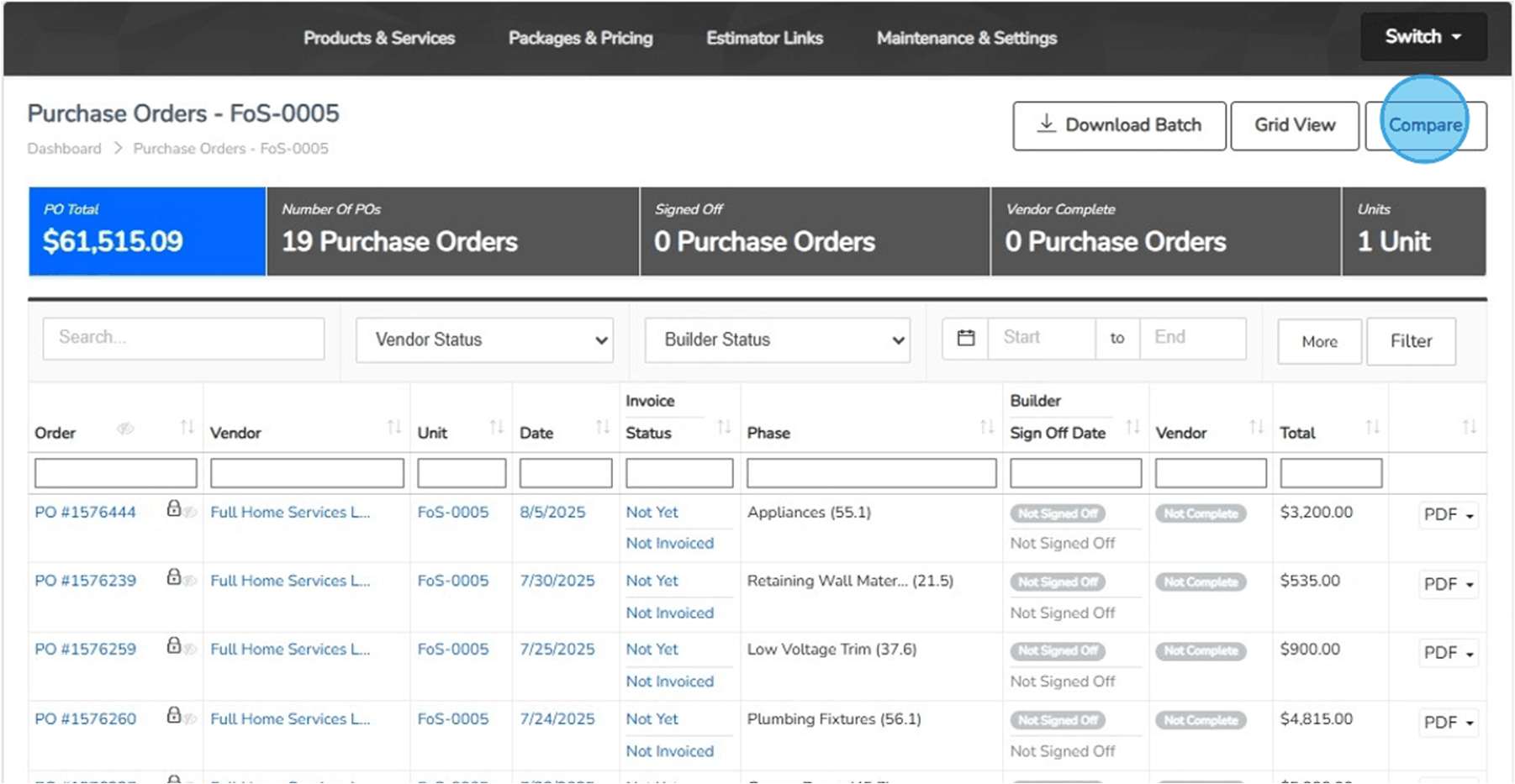
Review schedule and sign-off information alongside purchasing and invoice context. Work with finance to resolve open questions; a field sign-off is not a cash payment.
WORKING EXAMPLES
Start with a business question.
Follow a question from problem to decision.
Illustrative walkthroughs · Sample data.
01How does extra work get back into the plan?
The problem
Extra work on site
A trade needs additional work on a home. The superintendent needs to coordinate it, while purchasing needs the reason, vendor, scope, and approval in the record.
ILLUSTRATIVE EXAMPLE
- Home
- Lot 42 · illustrative
- Work
- Additional plumbing work
- Question
- Who approves and coordinates it?
What you do in TK
Record and coordinate
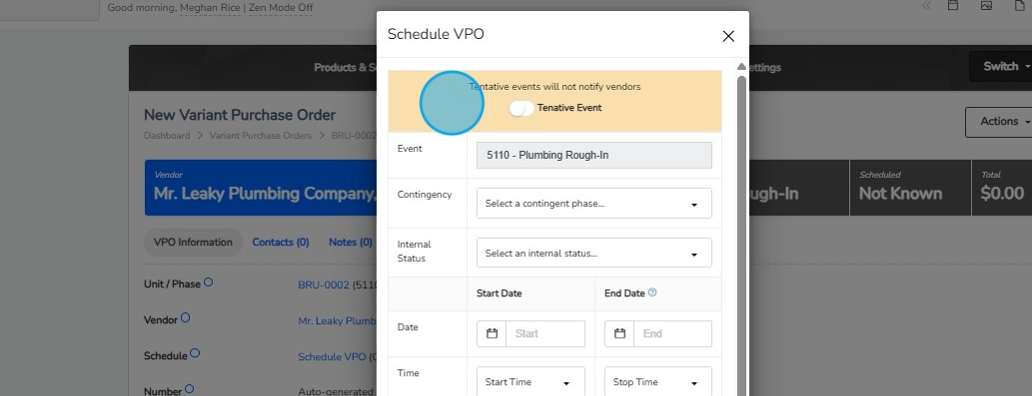
Create a variant purchase order with its reason and supporting context. Route it through the approval process and use Schedule VPO to associate the work with an event and its dates.
ILLUSTRATIVE EXAMPLE
- Purchasing
- Document the variant
- Approver
- Review the request
- Schedule
- Associate event and timing
What you see
Different records, clear states
The variant has its own status and schedule context. Approved variants are included in the current budget; the unit schedule or calendar provides the sign-off workflow.
ILLUSTRATIVE EXAMPLE
- Approval
- Has the variant been approved?
- Schedule
- When is the work planned?
- Sign-off
- What work is recorded as complete?
The decision it supports
Agree the next action
Decide whether the request is ready for approval and coordination, or needs more scope detail. Review completion with the trade and purchasing, then give accounting the supporting context for the invoice review.
ILLUSTRATIVE EXAMPLE
- Construction
- Coordinate the work
- Purchasing
- Confirm the commitment
- Accounting
- Review the bill separately from payment
ACTUAL PRODUCT SCREENS
See the records your team works with.
The supplied guides show how a variant is associated with a schedule event, and how purchase orders retain invoice and sign-off context.
How the work moves between teams.
- Sales & Design → Construction
- Review documented buyer choices and approved changes with the home’s plans. Ask for unresolved scope to be settled before coordinating the affected work.
- Construction ↔ Purchasing
- Record the reason for extra work and coordinate the vendor, approval, and schedule event. Keep the exception visible to the people arranging and reviewing the work.
- Construction → Finance
- Bring progress, sign-off, and outstanding-work questions into the job review. Finance can compare that context with commitments, invoices, and posted costs.
The builder’s perspective.
“ThreadKore has been instrumental in tightening our cycle time, protecting our margins, and giving us the ability to scale.”
“It has greatly enhanced our operations by improving the accuracy of our reporting and seamlessly aligning our purchasing and billing systems.”
ONE PLATFORM, RELEVANT TOOLS
Available tools for your work.
Give every home a shared starting point.MyPM Available today
Organize communities, lots, addresses, and unit records. Keep development milestones and construction context with the home so teams can find the same starting point.
- Subdivision and lot organization — Organize the community and lots that provide the starting point for each unit.
- Unit addresses, plans, and reference information — Create a common home record with the location and reference details the team uses.
- Development and construction milestones — Keep milestones and dates in the context of the community and home.
- Project documents and coordination — Bring project documents and communication into the conversation around the work.
Know the scope before you commit.Purchasing & PO workflows Available today
Import unit takeoffs, compare budgets, and issue purchase orders with job and vendor context. Document exceptions through variant purchase orders, approval levels, reasons, and back charges.
- Takeoff imports and budget updates — Import unit takeoffs and compare current quantities and pricing with the budget before updating it.
- PO quantities, prices, vendors, and unit context — Record the vendor, home, scope, quantity, and price on the purchase order.
- Budget comparison and linked invoices — Compare PO budgets and open associated invoices from the purchasing record.
- VPO reasons, approval levels, and back charges — Document the reason for an exception and retain its approval and back-charge context.
Give both sides a clearer view of the work.JobCloser Available today
Bring trades and vendors into their builder relationships. Connect vendor-visible purchase orders, invoice submissions, and compliance documents with the builder’s operating record.
- Builder invitations and vendor access — The builder invites trades or vendors to join the working relationship in JobCloser.
- Vendor-visible purchase orders — Vendors can review purchase orders made visible by the builder.
- PO and VPO invoice submissions — Bring vendor invoice submissions back into the builder’s review process.
- Compliance document submissions and review — Vendors submit compliance documents for builder review; Vendor Management retains request history.
Keep the buyer’s promise connected to the build.theHOMESapp Available today
Bring Guided Start, plans, design sheets, retail pricing, and signatures together. Document selection changes so the team can follow what was decided and approved.
- Guided Start, plans, and packages — Organize the home’s plan and package choices before committing the work.
- Design sheets and retail price history — Keep design categories and choices with their retail pricing and price history.
- Finalized selections and proposed design changes — Finalize decisions and use the proposed-change process for subsequent changes.
- Change-order batches and contract signatures — Group proposed changes and capture approval/signature records around the home.
Orbit brings intelligence to the connected information.
ThreadKore is the system of record. Orbit analyzes connected operational and financial information to help teams investigate changes and compare records. Orbie supports clients along the way.
Watch the illustrative Orbit walkthrough